OnceEver
Features

What OnceEver does, feature by feature.

Seven chapters, each on the app’s own screens. The films beside the main features are drawn from the app’s labels, colours and layout, not recorded from its screens.

01
Inside a card

Everything worth learning from a phrase, on one card.

A card holds three kinds of point: the differences the marking found, the words you picked out yourself, and the answers to your own questions. Each comes back on a schedule of its own.
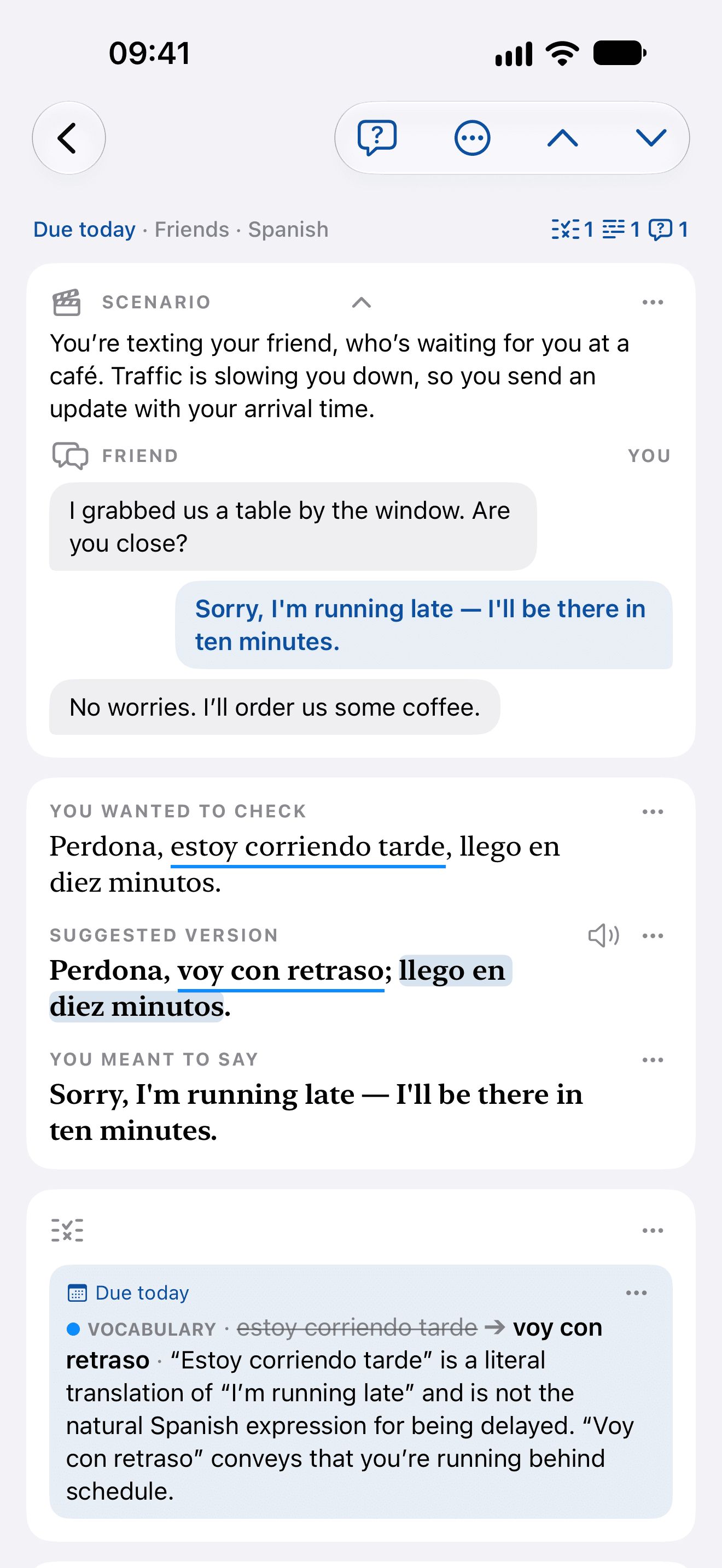
  1. A Spanish card from the top: the scene, a text to a friend who is waiting, the attempt and the suggested version
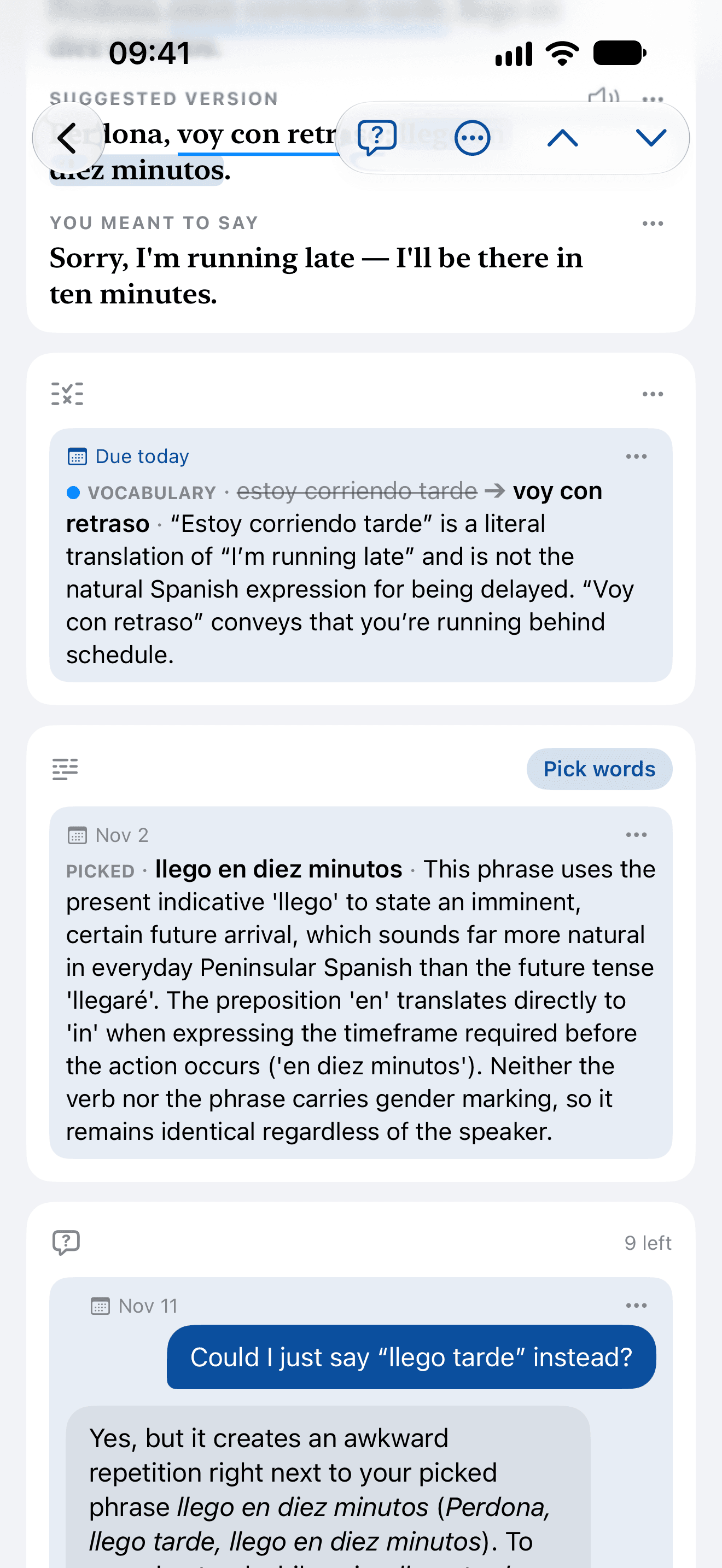
  2. The same card’s points: a vocabulary difference, a picked phrase explained, and a question answered
Spanish: a text to a friend who’s waiting, from the top, then its points
Marked

estoy corriendo tardevoy con retraso

Where yours and a native’s differ, named by kind, with the reason in a sentence.
Picked

llego en diez minutos

Words you chose to learn, explained when you ask. In review they’re blanked, and you write them back.
Asked

Could I just say “llego tarde” instead?

Your own question about the card, answered by a helper that has read all of it.
The marking

See what changed, and what kind of change it is.

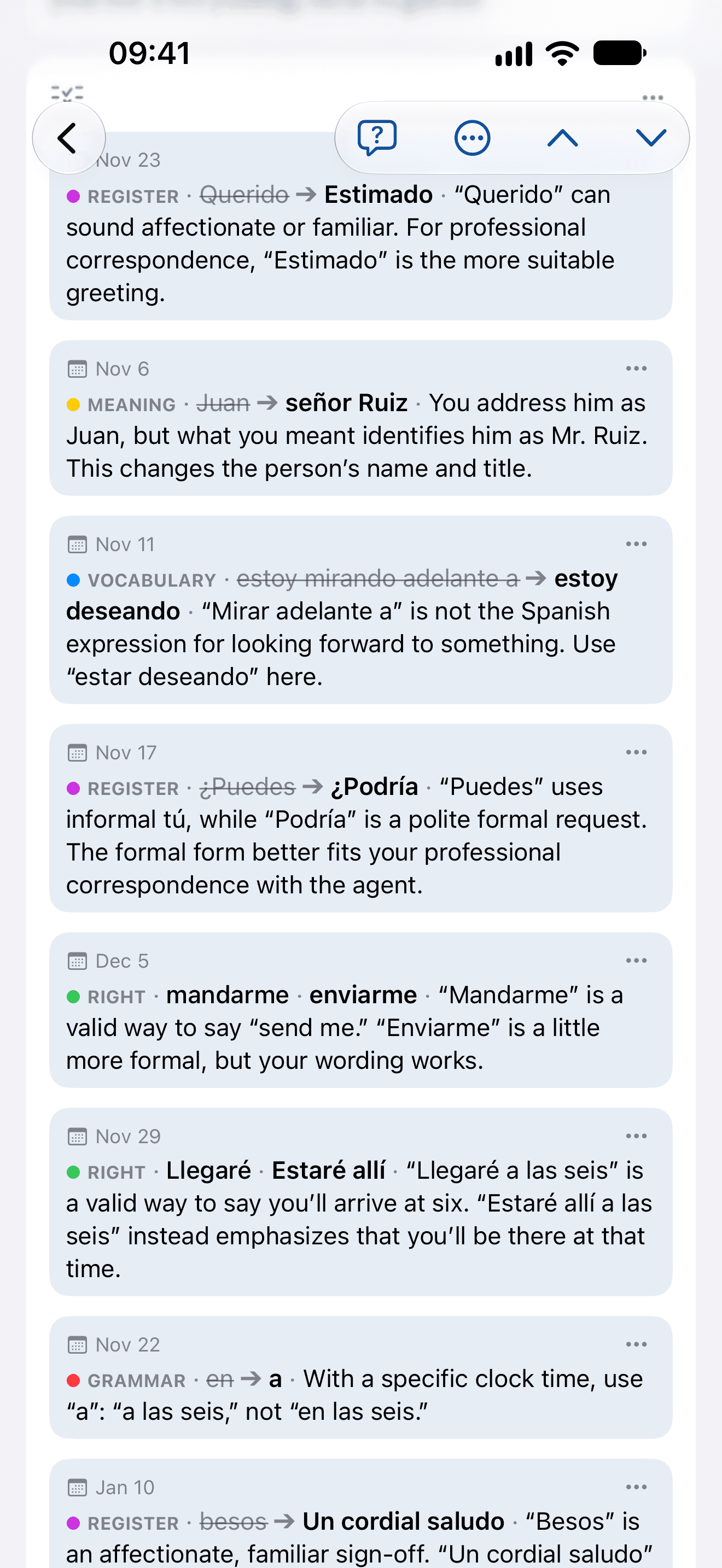
An email to the estate agent, written the way you’d text a friend. The marking finds each difference down to the word, files it under one of six kinds, and says why in a sentence. The sixth is good news: green means yours was simply another good way to say it.

  • Meaning
  • Vocabulary
  • Register
  • Grammar
  • Culture
  • Right
0:00 / 0:00
Script. Write one phrase in the language you're learning: Querido Juan, estoy excitado para ver el apartamento. ¿Puedes mandarme la dirección? Estaré allá en las seis de la noche. OnceEver writes it as a native would, and reads what you meant: Estimado Juan: Tengo muchas ganas de ver el apartamento. ¿Puedes enviarme la dirección? Estaré allí a las seis de la tarde. Dear Juan, I'm excited to see the apartment. Can you send me the address? I'll be there at six in the evening. You write one phrase; OnceEver does the rest. Every difference is marked in its colour and explained in your language: register, Querido Juan to Estimado Juan; vocabulary, estoy excitado para ver to Tengo muchas ganas de ver; right, mandarme to enviarme; vocabulary, allá to allí; grammar, en las seis to a las seis; meaning, de la noche to de la tarde — the first explanation read, the others faster. Six colours, six kinds of difference: grammar, vocabulary, register, culture, meaning, right. Add what’s worth reviewing, keep out the rest: six undecided tiles, five added to review and due today, and the right one, mandarme · enviarme, kept out of review.

The suggested version, what you meant and the six explanations are what the app wrote for that sentence: a Check card, Professional, B1, explained in English.
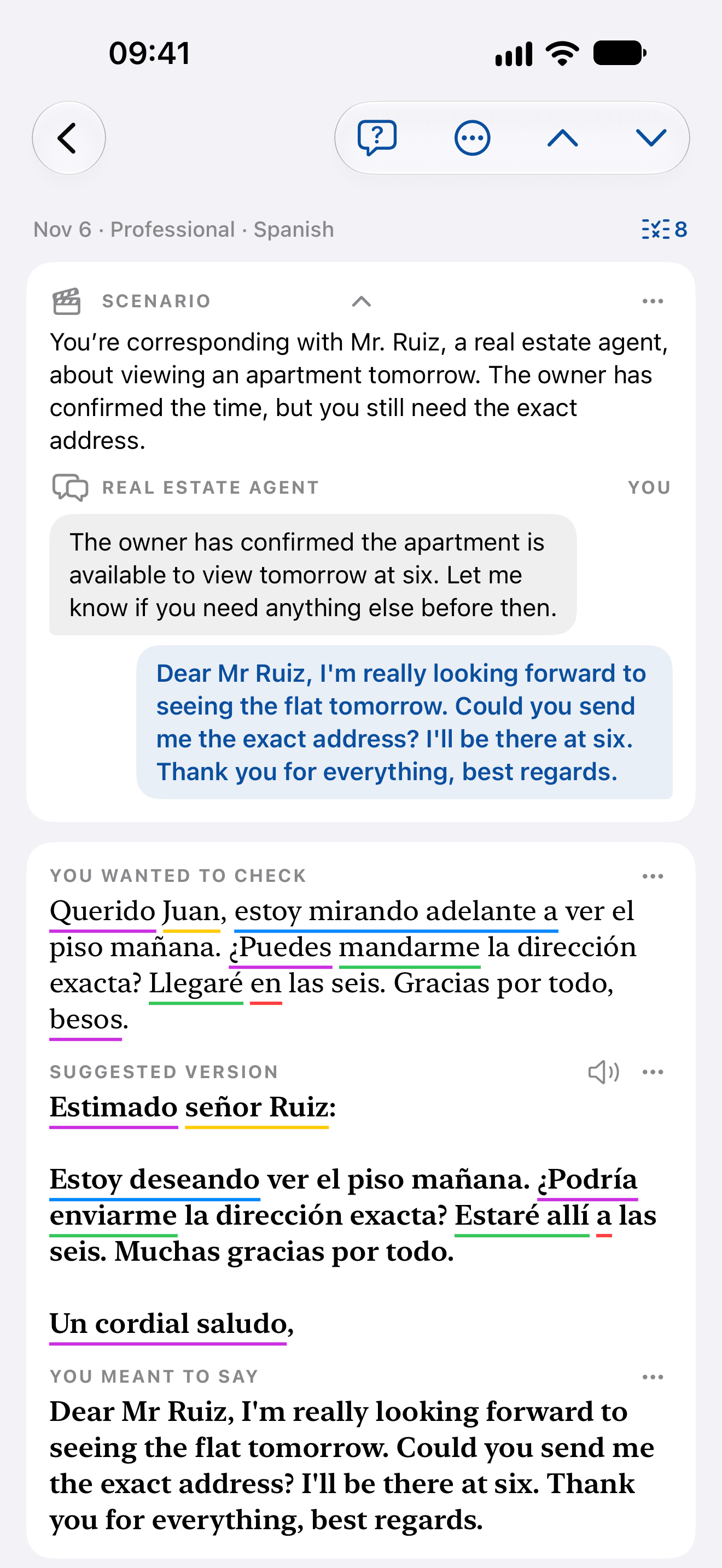
  1. A Spanish email to an estate agent, marked: each difference underlined in its kind’s colour under the attempt and the suggested version
  2. The email’s eight points in five kinds, each with its kind, the change and a sentence on why
Spanish: an email to the estate agent, then its points alone
Picked words

Pick the words a native would use, and get them explained.

Touch a word, or drag across several; lift and touch again for another group. A group can be split across the sentence, the way German splits rufe … an. Explain writes a few sentences on what those words are doing there, and the card keeps them.

0:00 / 0:00
Script. Found a phrase worth keeping? You wanted to learn: Ich rufe dich heute Abend an, sobald ich zu Hause bin – versprochen! What it means: I'll call you tonight as soon as I'm home — promise! Pick the words you want to learn: a drag across zu Hause makes the first group. Even a verb split in two: Free pick, then rufe, then an, then Add the group makes rufe … an one group; a touch on versprochen makes a third. Add them to the card: the picks are highlighted on the phrase and listed as three points due today. Explained when you ask: Explain writes what each pick is doing. Then each pick comes back as a blank: Ich blank dich heute Abend blank, the other picks greyed out. Type it, or say it: rufe is typed into the first hole and checked, an is said into the second; then the rating buttons appear. OnceEver. Pick what's worth learning.

The three explanations are what the app wrote for those picks: a Translate and Learn card, Neutral, B1, explained in English.
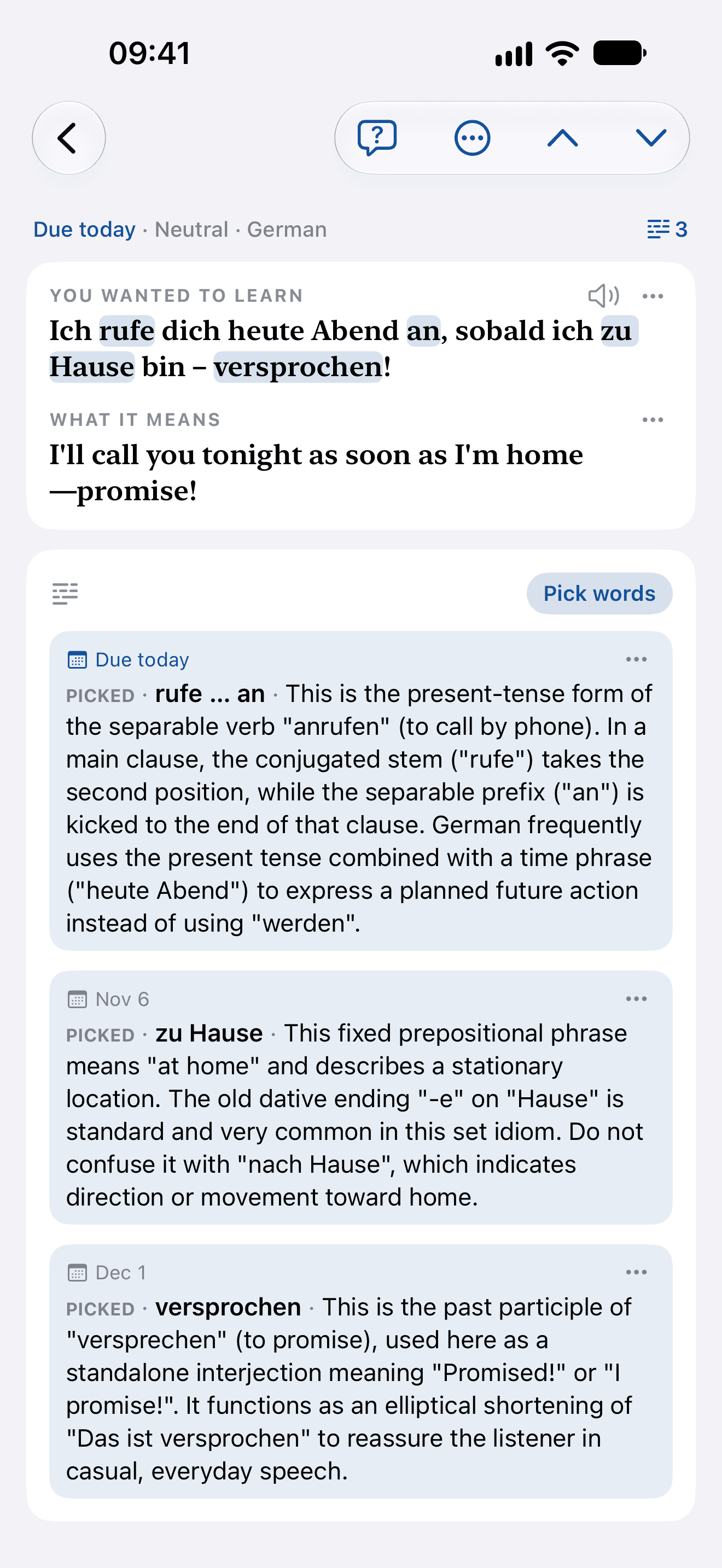
  1. The German card’s three picked groups, rufe … an, zu Hause and versprochen, each explained
German: groups picked, one split across the sentence, then explained
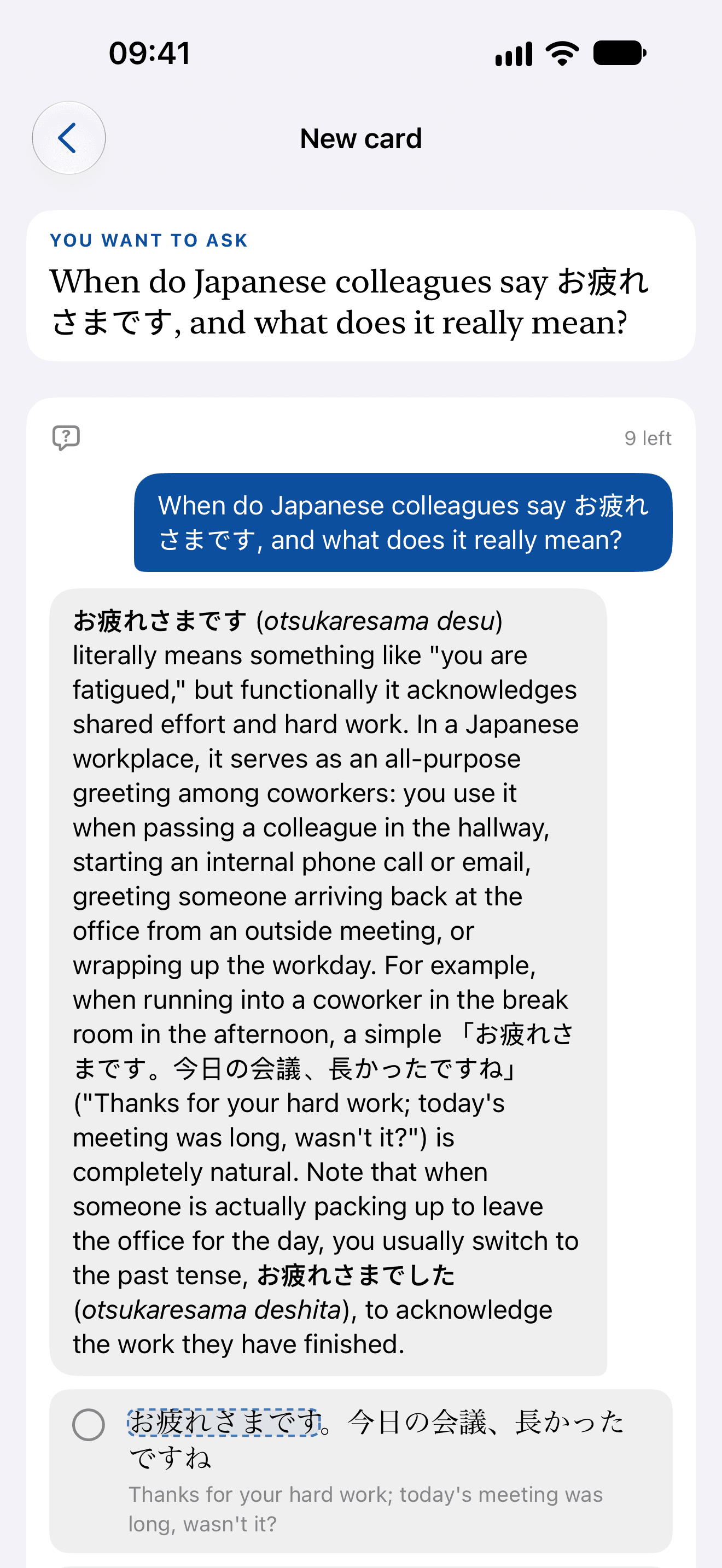
A card started from a question: when Japanese colleagues say お疲れさまです and what it really means, with the answer
Japanese: a card that started as a question
Questions

Ask what the marking didn’t answer.

Every card has its questions. The helper has read all of it — the scene, your attempt, the reference, the points — so you ask about this sentence, not about grammar in general. An answer worth keeping is a tap away from review, and a card can start from a question alone.

0:00 / 0:00
Script. Something the marking didn't answer? The card: you wanted to check Perdona, estoy corriendo tarde, llego en diez minutos; the suggested version Perdona, voy con retraso; llego en diez minutos. Ask it, right on the card: Could I just say “llego tarde” instead? is typed into the Questions box and asked. Answered for this very sentence: Yes, but it creates an awkward repetition right next to your picked phrase llego en diez minutos (Perdona, llego tarde, llego en diez minutos). To sound natural while using llego tarde, you would typically combine them into a single clause like Perdona, llego diez minutos tarde, which means "Sorry, I'm running ten minutes late." If you want to keep the structure with two separate clauses, voy con retraso (or voy tarde) works much better for the first part. Worth keeping? Add it to review: the question and its answer become a point, due today. It comes back as a question: You asked, what was the answer to your question? Recall the answer before you look; the answer stays behind its curtain. OnceEver. Ask once. Remember the answer.

The question was asked on a real card, and the answer is what the app wrote to it: a Check card, Friends, B2, answered in English.

The scene

Every card gets a moment to be said in.

A situation and a short dialogue with your line in it, written in your language so you see how your phrase was understood. Turn it into the language you’re learning, hear every line, and pick more phrases from it.

0:00 / 0:00
Script. Every phrase has its moment: the card's Scenario, You're texting your friend, who's waiting for you at a café. Traffic is slowing you down, so you send an update with your arrival time. OnceEver sets the scene around it: Friend: I grabbed us a table by the window. Are you close? You: Sorry, I'm running late — I'll be there in ten minutes. Friend: No worries. I'll order us some coffee. In your language, as it was understood. Then in the language you're learning: from the Scenario's menu, Show the scenario in the language you are learning: Te he cogido una mesa junto a la ventana. ¿Te queda mucho? Perdona, voy con retraso; llego en diez minutos. Tranquilo. Voy pidiendo unos cafés. Hear every line: the scene is read aloud, line by line. Pick more phrases from it: Pick phrases, a sweep across Voy pidiendo, Save to your cards, Saved. OnceEver. Learn it where you'd say it.

The scenario and its dialogue in English are the app’s own, from a real card; the Spanish lines are written for the film.

02
Ideas

No text at hand? Ideas writes one, at your level.

Choose what it should be and, if you like, give it a few keywords or a hint — or leave that empty and it grows from phrases you’ve already kept. Every line comes with its translation and can be heard in its speaker’s voice. Sweep what’s worth having: each sentence you swept becomes a card, its meaning already written.
  • Dialogue
  • Messages
  • Voicemail or announcement
  • Email
  • Online reviews
  • Short story
  • Recipe or instructions
  • News
  • Opinion column
0:00 / 0:00
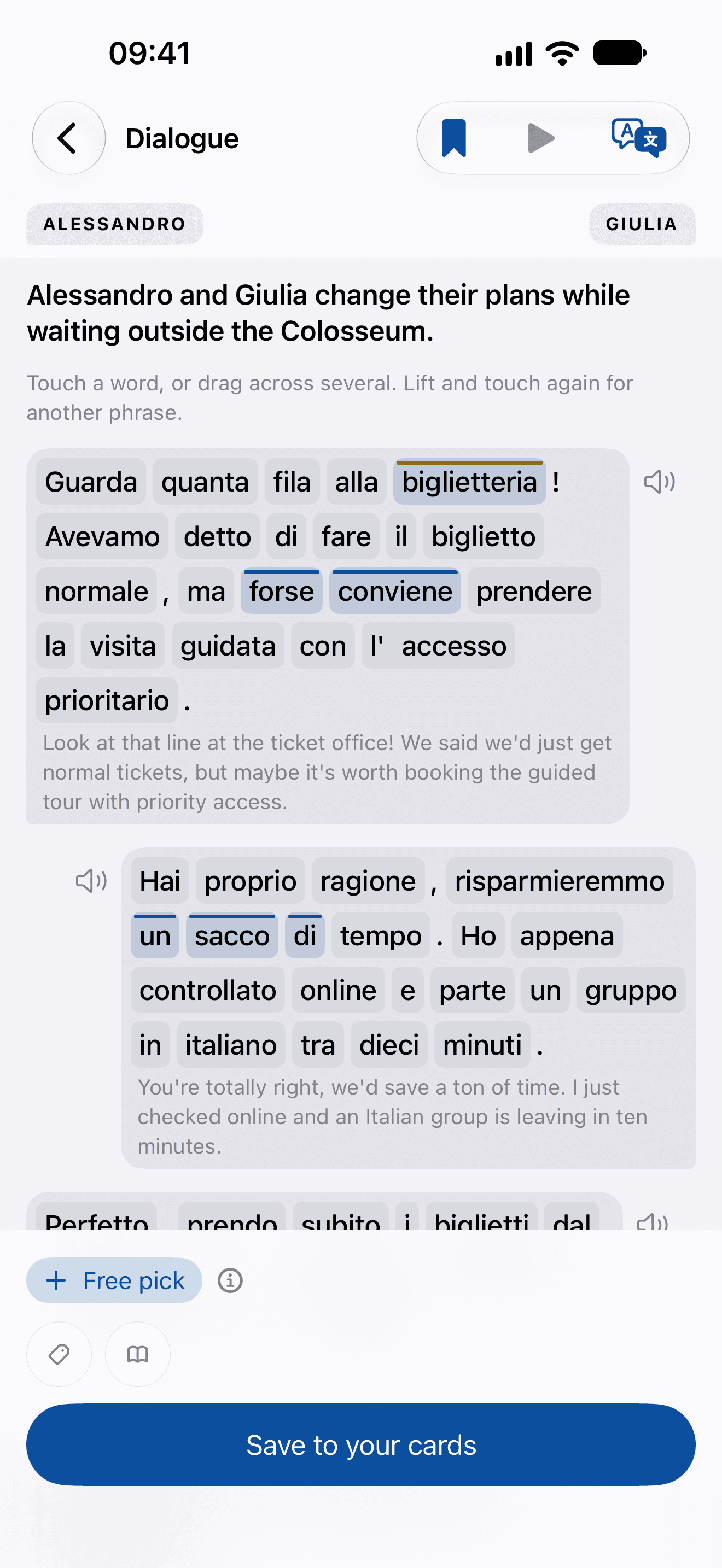
Script. No phrase to start from? Ideas: Language Italian, B1; Type Dialogue; Keywords or hints: Waiting outside the Colosseum; Write a dialogue. Ideas writes a text at your level: Alessandro and Giulia change their plans while waiting outside the Colosseum. Alessandro: Guarda quanta fila alla biglietteria! Avevamo detto di fare il biglietto normale, ma forse conviene prendere la visita guidata con l’accesso prioritario. (Look at that line at the ticket office! We said we’d just get normal tickets, but maybe it’s worth booking the guided tour with priority access.) Giulia: Hai proprio ragione, risparmieremmo un sacco di tempo. Ho appena controllato online e parte un gruppo in italiano tra dieci minuti. (You’re totally right, we’d save a ton of time. I just checked online and an Italian group is leaving in ten minutes.) Pick the phrases worth having: biglietteria, forse conviene, un sacco di. Each becomes a card, ready to review: Save to your cards, both sentences saved. Keep the text in your Library: the bookmark. OnceEver. Pick phrases to learn from texts written at your level.
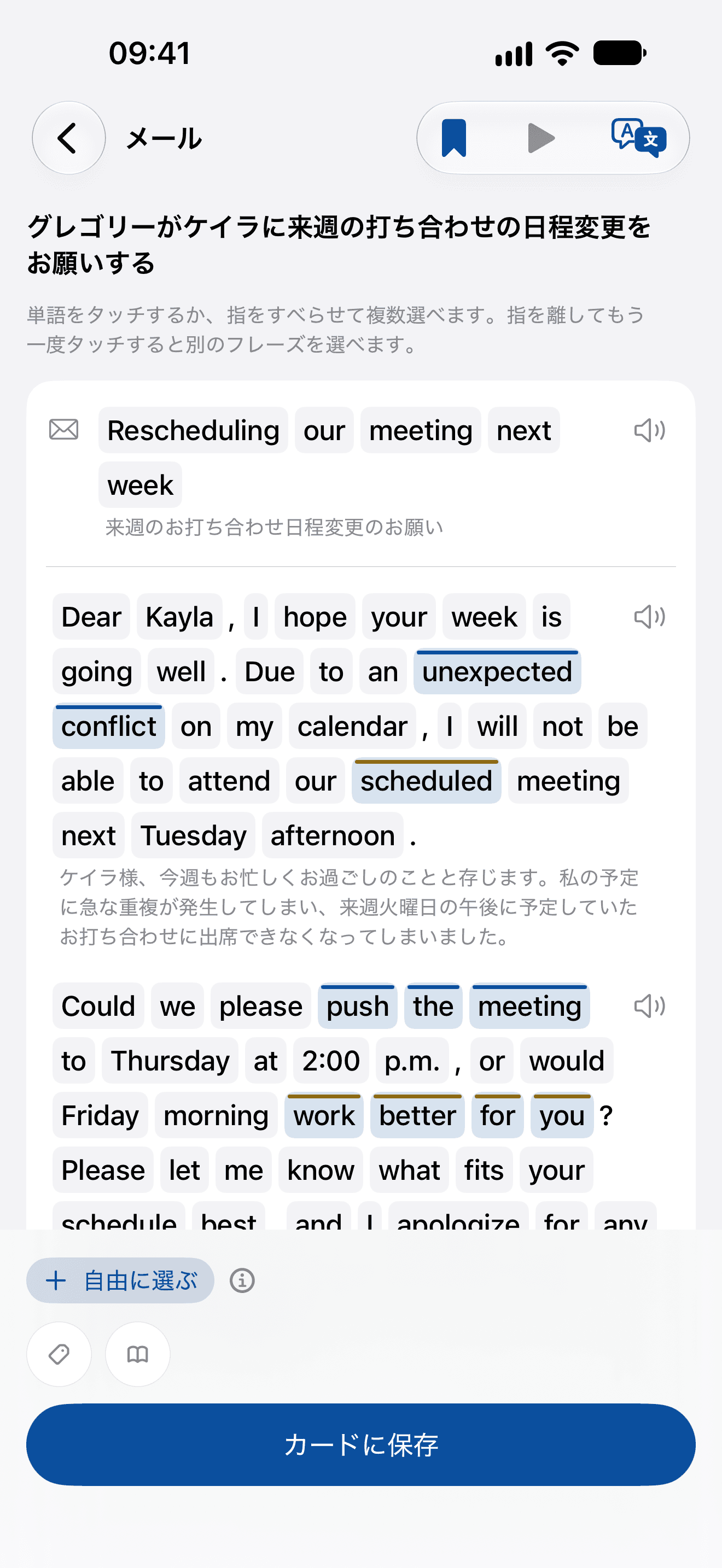
  1. EmailMoving a meeting
    Email, Moving a meeting: English, for a Japanese speaker, on its own page, a few phrases picked and a speaker on each part
    English, for a Japanese speaker
  2. DialogueAt the Colosseum’s ticket office
    Dialogue, At the Colosseum’s ticket office: Italian, on its own page, a few phrases picked and a speaker on each part
    Italian
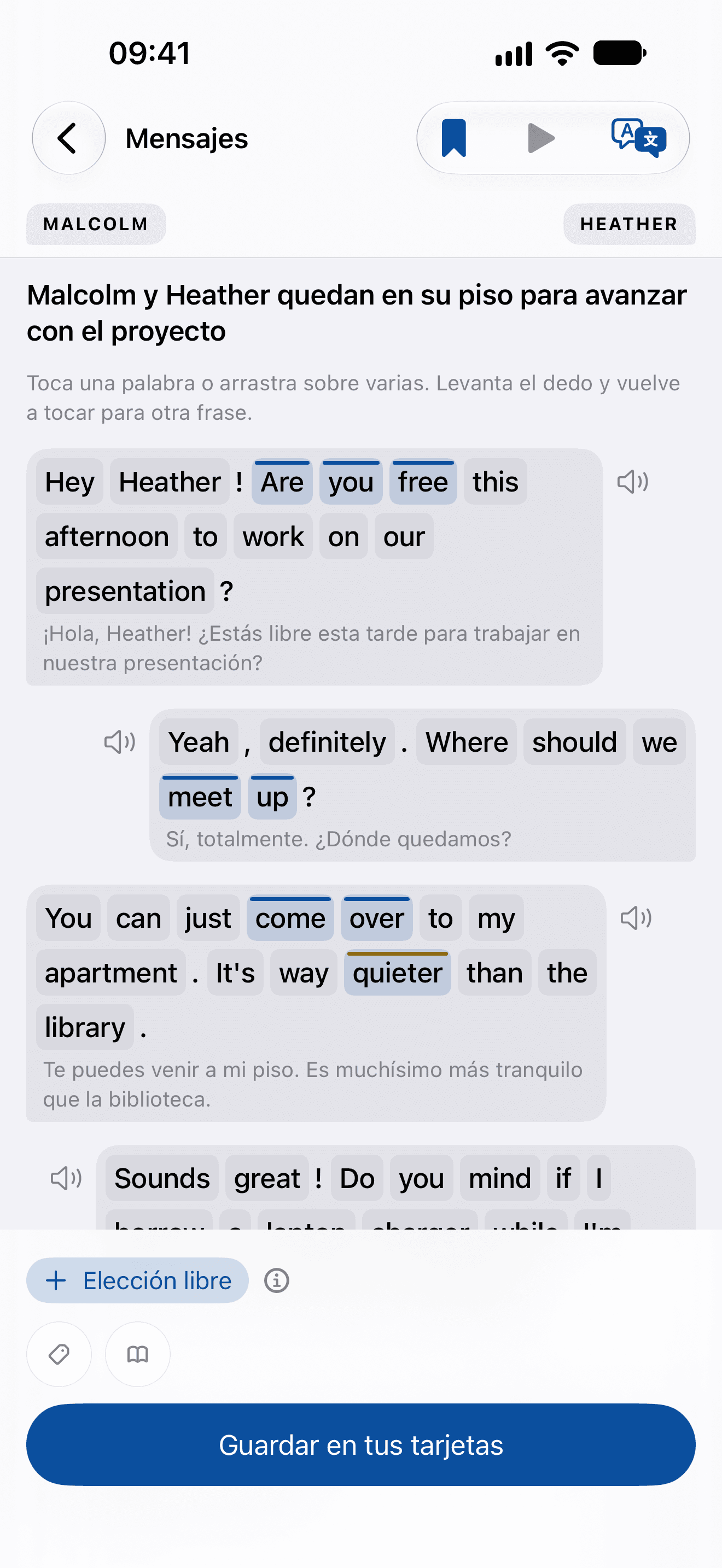
  3. MessagesAn afternoon’s work at a friend’s flat
    Messages, An afternoon’s work at a friend’s flat: English, for a Spanish speaker, on its own page, a few phrases picked and a speaker on each part
    English, for a Spanish speaker
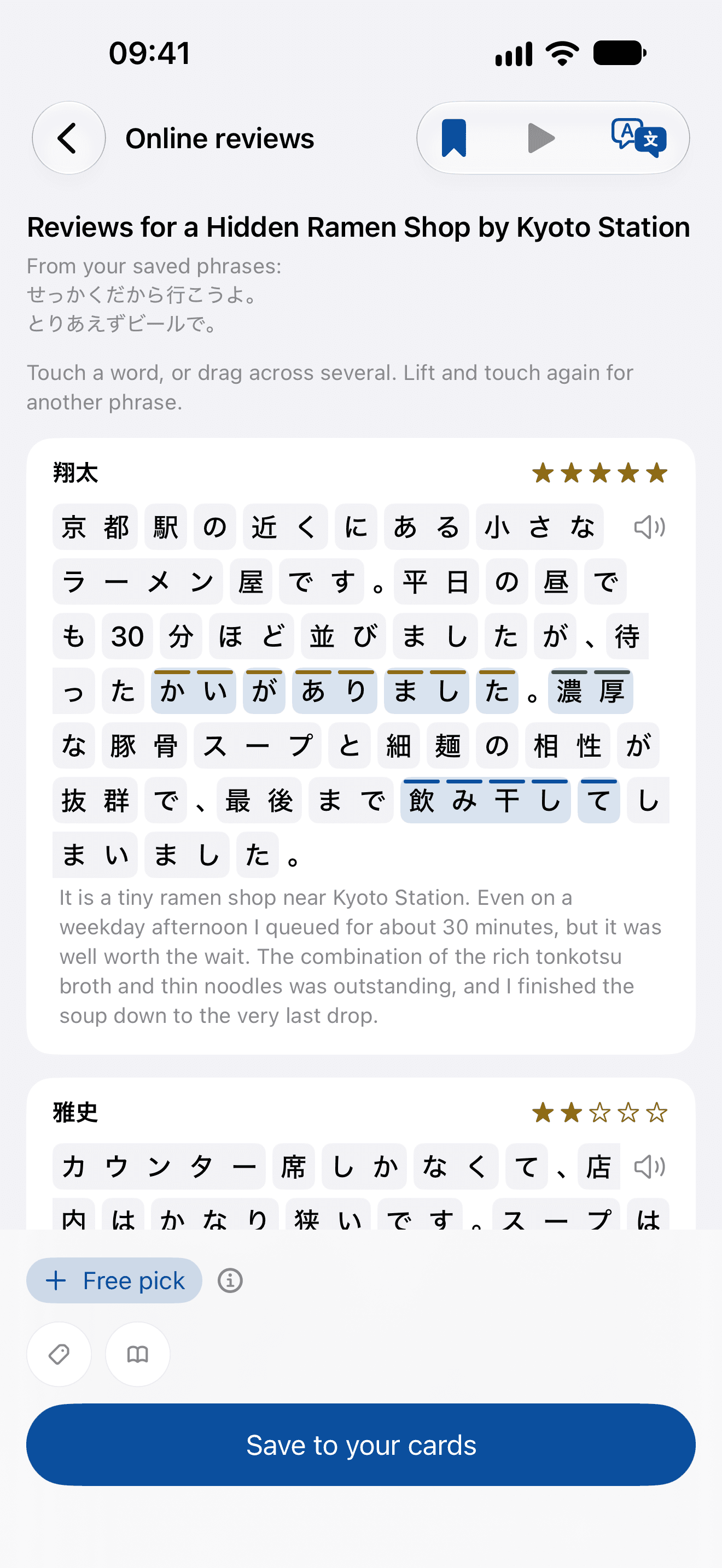
  4. Online reviewsA ramen shop by Kyoto Station
    Online reviews, A ramen shop by Kyoto Station: Japanese, on its own page, a few phrases picked and a speaker on each part
    Japanese
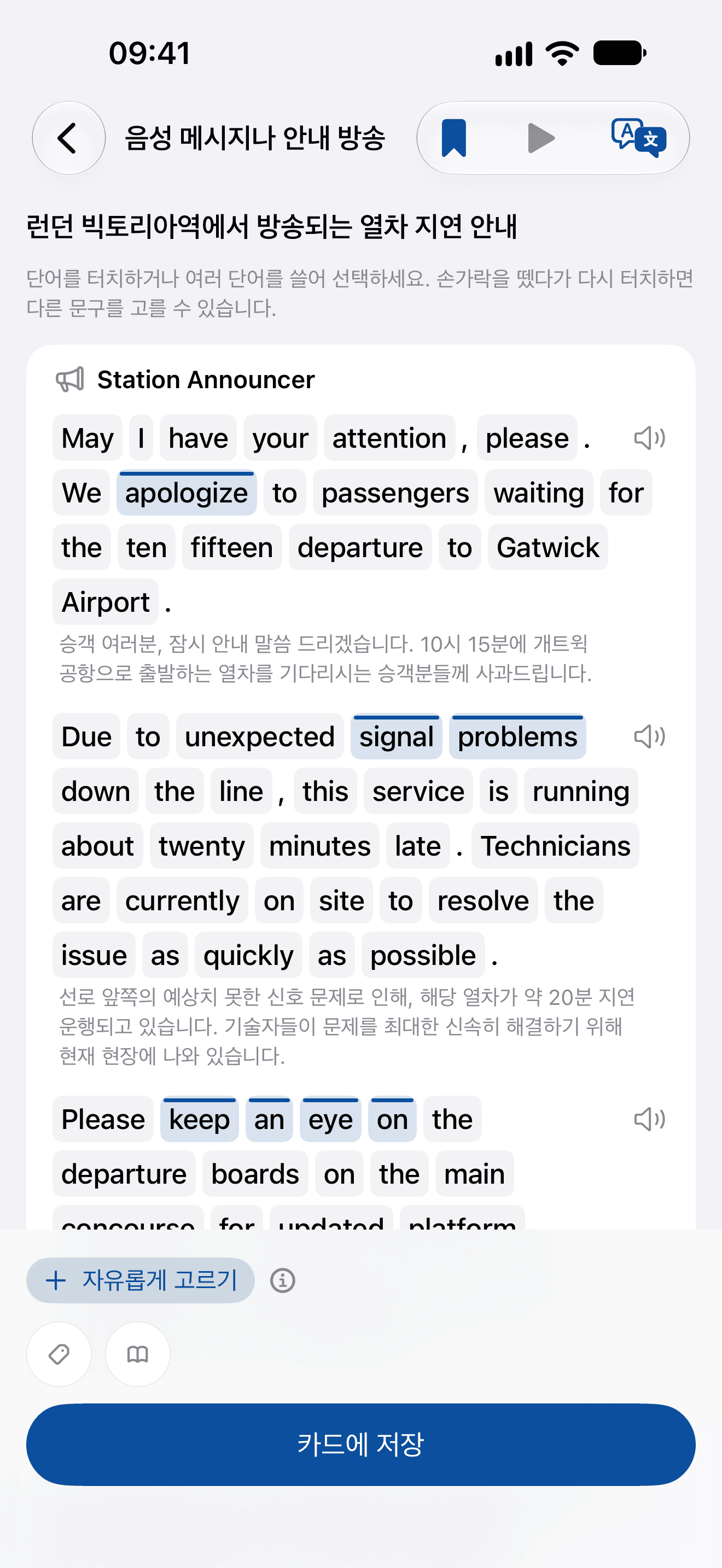
  5. Voicemail or announcementA delay at London Victoria
    Voicemail or announcement, A delay at London Victoria: English, for a Korean speaker, on its own page, a few phrases picked and a speaker on each part
    English, for a Korean speaker
0:00 / 0:00
Script. Not only dialogues: Ideas, German at B1; the Type menu lists Any, then Dialogue, Messages, Voicemail or announcement, Email, Online reviews, Short story, Recipe or instructions, News and Opinion column; Voicemail or announcement is chosen. Keywords or hints: My landlord, about the plumber's visit. Write a voicemail or announcement. A voicemail, at your level: Dieter leaves a voicemail for Ulrike about the plumber's appointment. Dieter: Guten Tag, Frau Weber, hier ist Dieter Meyer, Ihr Vermieter. Ich rufe wegen des tropfenden Wasserhahns in Ihrer Küche an. (Hello, Ms. Weber, this is Dieter Meyer, your landlord. I am calling about the leaking faucet in your kitchen.) Dieter: Ich habe den Klempner endlich erreicht, und er könnte morgen Vormittag gegen zehn Uhr bei Ihnen vorbeikommen. Geben Sie mir bitte kurz Bescheid, ob das bei Ihnen passt. (I finally reached the plumber, and he could stop by your place tomorrow morning around ten o'clock. Please let me know briefly if that works for you.) Dieter: Falls Sie nicht da sind, könnte ich ihn mit dem Zweitschlüssel reinlassen, natürlich nur mit Ihrer Erlaubnis. Rufen Sie mich einfach zurück, vielen Dank! (In case you are not there, I could let him in with the spare key, only with your permission of course. Just give me a call back, thank you very much!) So the real one is easier: tropfenden Wasserhahns, vorbeikommen and Zweitschlüssel are picked, each sentence listed as its card will be, in the voice Professional, and Save to your cards. Reviews, at your level too: Japanese at B1, Online reviews, Write reviews. Reviews for a Hidden Ramen Shop by Kyoto Station, from your saved phrases せっかくだから行こうよ。 とりあえずビールで。. 翔太, 5 of 5: 京都駅の近くにある小さなラーメン屋です。平日の昼でも30分ほど並びましたが、待ったかいがありました。濃厚な豚骨スープと細麺の相性が抜群で、最後まで飲み干してしまいました。 (It is a tiny ramen shop near Kyoto Station. Even on a weekday afternoon I queued for about 30 minutes, but it was well worth the wait. The combination of the rich tonkotsu broth and thin noodles was outstanding, and I finished the soup down to the very last drop.) 雅史, 2 of 5: カウンター席しかなくて、店内はかなり狭いです。スープは私には少し油っこすぎて、途中で重く感じてしまいました。行列に並んでまで食べるほどではないと思います。 (There are only counter seats, and the inside of the shop is quite cramped. The broth was a bit too greasy for my taste, and halfway through it started feeling heavy. I do not think it is worth waiting in line for.) Pick what tells you where to eat: かいがありました, 濃厚 and 飲み干して. OnceEver. Every kind of text, at your level.

The voicemail is what Ideas wrote for a learner of German at B1, asked for as the film shows; the reviews are that learner’s own Ideas text, kept in their Library. Both are word for word, with their translations.

The texts you keep wait in your Library, beside any you paste yourself, to pick from again.

03
Reviews, fine-tuned

Tuned for the time you actually have.

Review is where the remembering happens, so it’s where the details went: what you’re asked, in what order and for how long.
Three ways to review
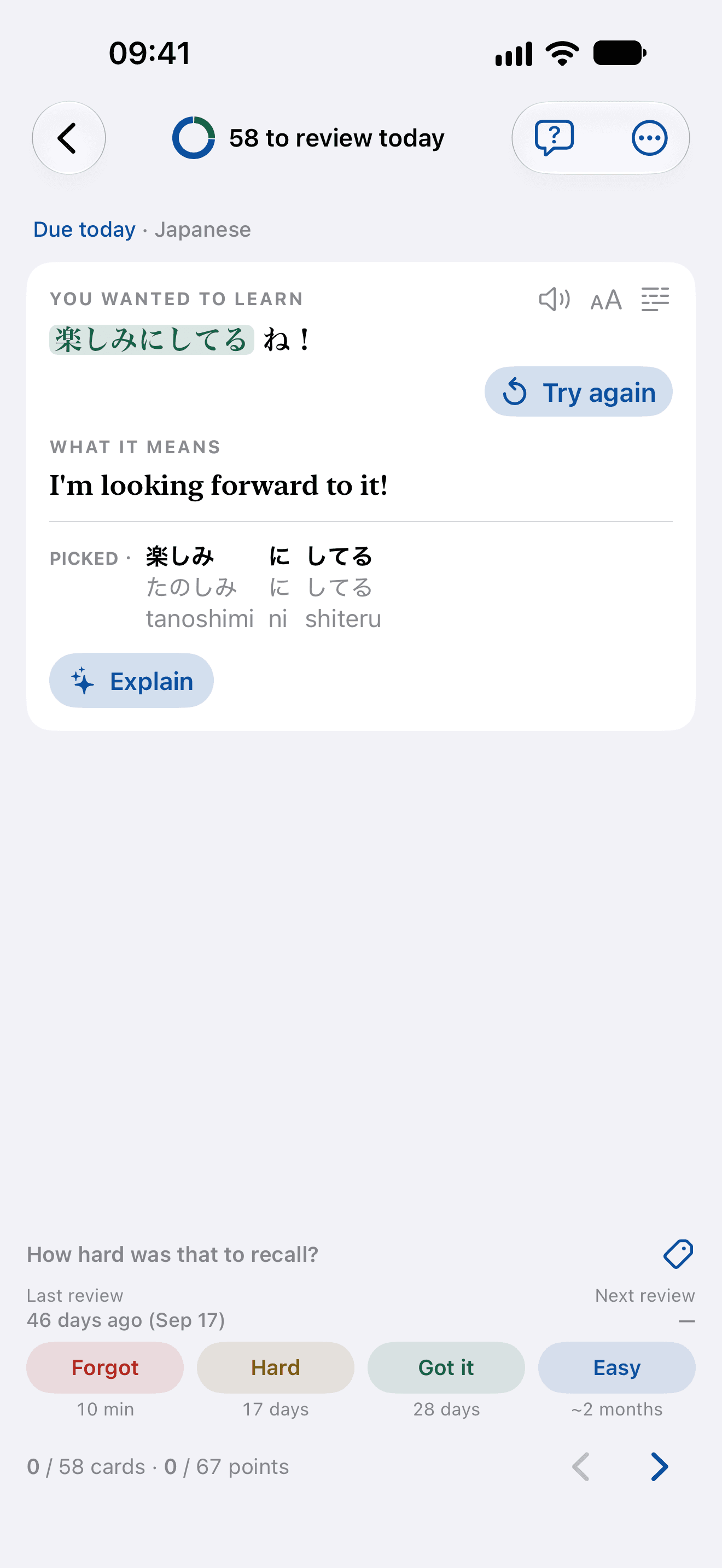
  1. A review step settled: the Japanese phrase written back and checked, Try again under it, the last review and the next review over the four ratings, and each rating’s gap under it
    StandardOne point per screen, and you rate it yourself.Recall it, reveal it, then say how that went. Nothing is scored for you, and nothing moves on until you’ve said so.
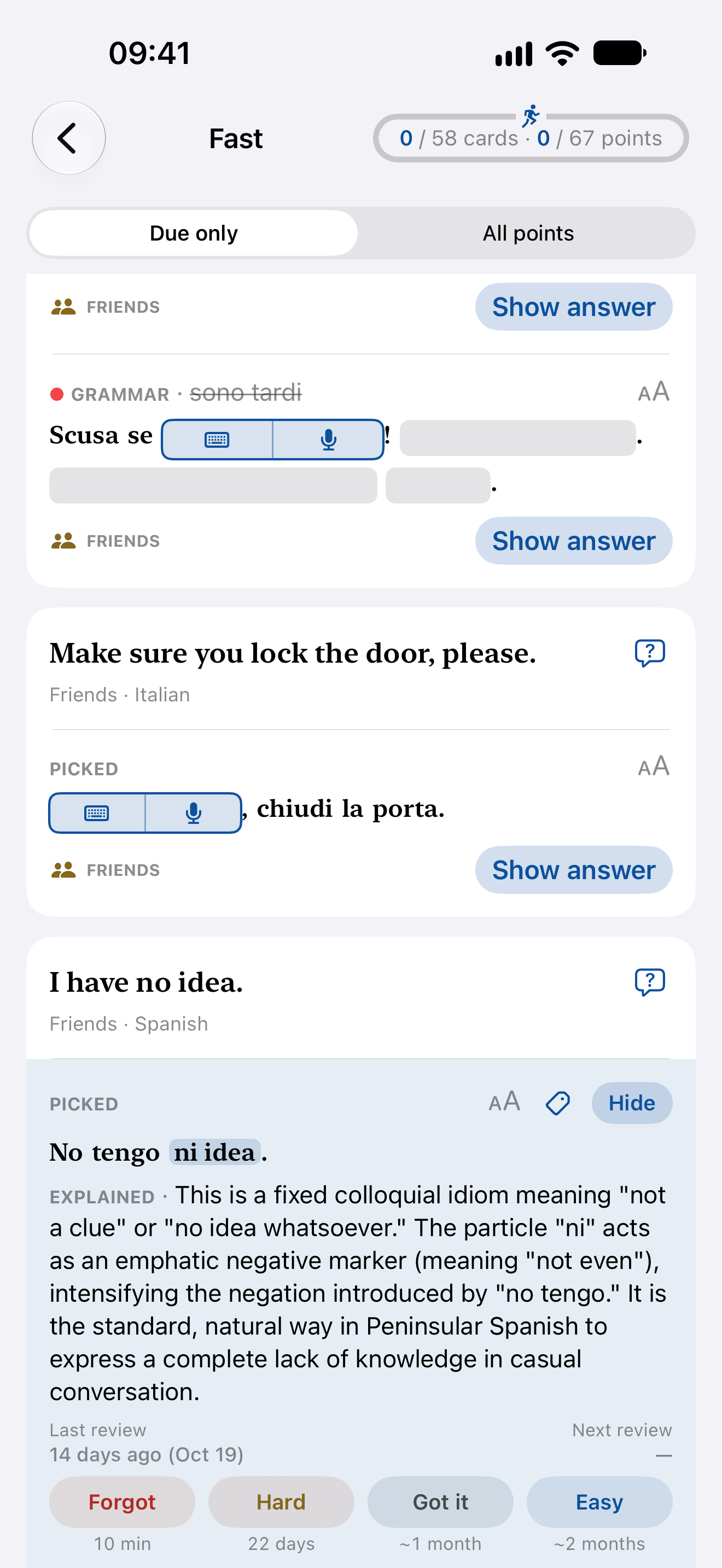
  2. Fast: due cards one under another, each blank asked by its keyboard and its microphone, a grammar slip in its corrected sentence, and the row being worked on in pale blue with its answer shown and the four ratings under it
    FastEvery due card on one page, and you rate as you go.Recall each point, then rate it, straight down the page — for a morning with less time.
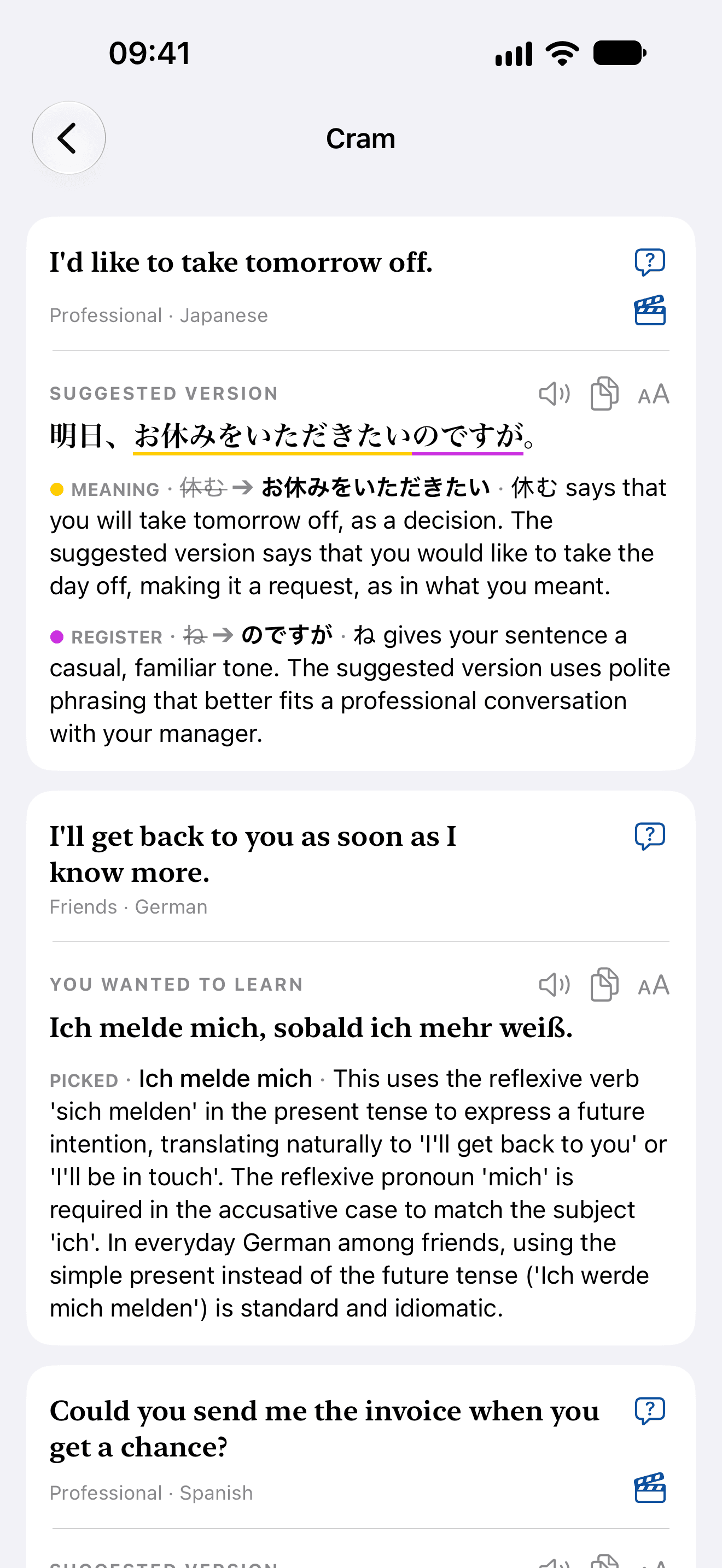
  3. Cram: cards open one under another, each with its phrase, its meaning and its points, nothing to answer
    CramEvery card open at once, and nothing recorded.Inside any deck or tag, your cards as a reading, the most overdue first. Nothing is asked or rated, and your schedule never moves.
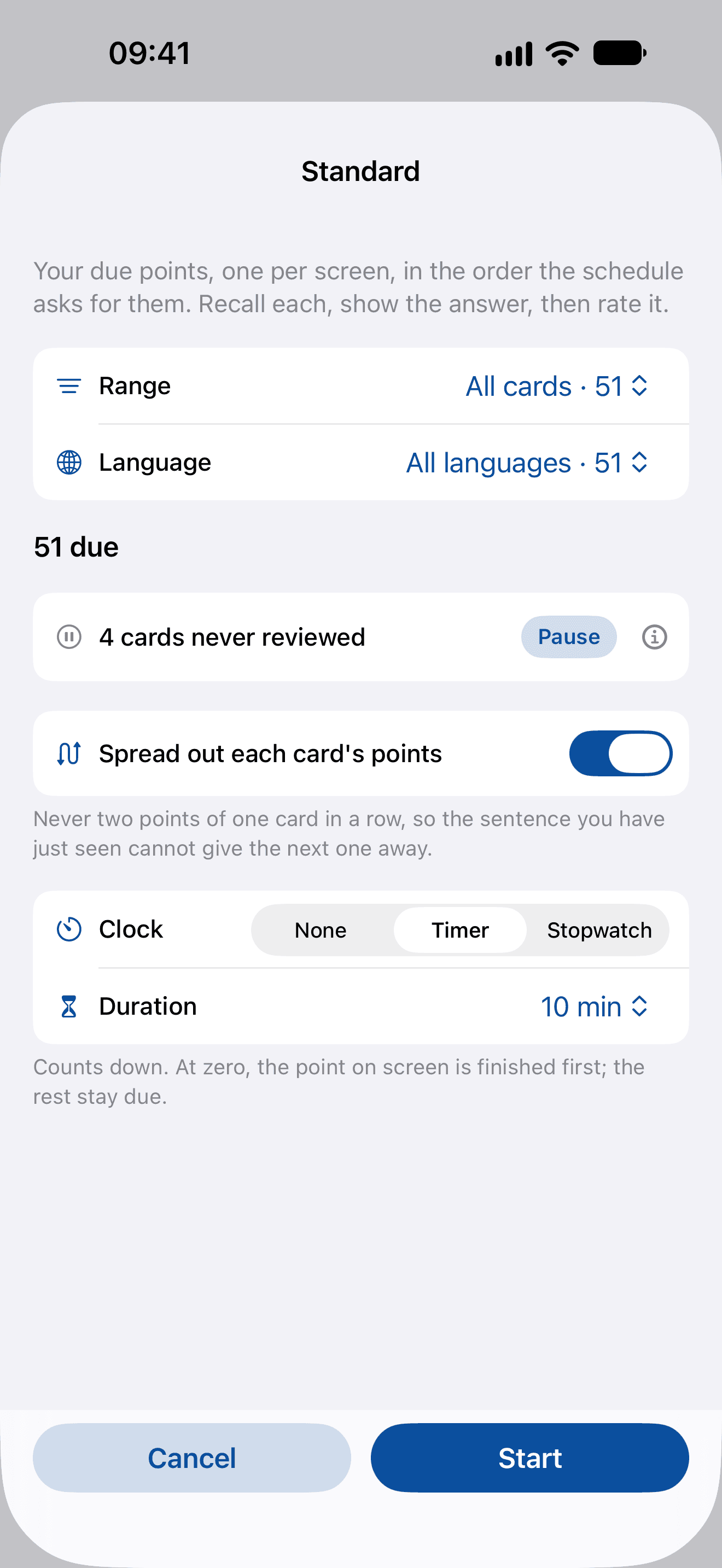
Standard’s sheet before a review: range and language, 51 due, four cards never reviewed with a Pause button beside them, spread out each card’s points switched on, and a ten-minute timer
Standard’s sheet: what to review, what to set aside, in what order, and for how long

Set the sitting before it starts.

Range and language
All your cards, one deck or one tag; every language or just one. Overdue only, for a morning when you’re behind.
Pause what you can’t take on yet
Added more than you can learn this week? The sheet counts the cards you’ve never reviewed and pauses them in one tap, within the range you chose. They leave your reviews until you resume them, and come back exactly as far along as you left them.
Spread out each card’s points
Never two points of one card in a row, so the sentence you’ve just seen can’t give the next one away.
A clock
A timer of five to forty-five minutes, or a stopwatch, remembered for each mode. At zero it never cuts a recall in half: the point on screen is finished first.
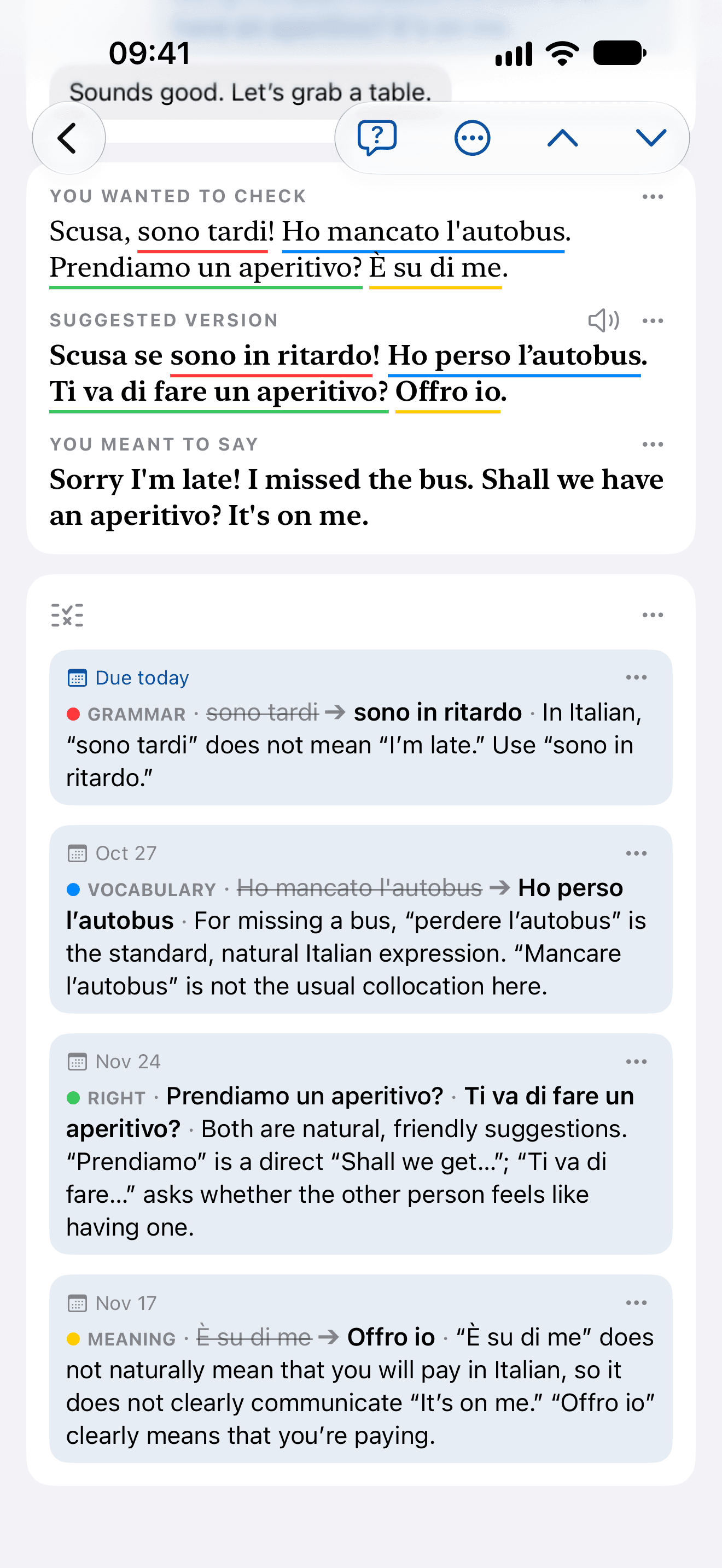
An Italian card’s four points, each with its own date: grammar due today, vocabulary on Oct 27, a right answer on Nov 24, meaning on Feb 8
Italian: one card, each point on its own date

One card, a date for each point.

Each point keeps its own schedule, so one card’s points drift apart as you learn them: the slip you keep making comes back next, and the one you’ve got waits months.

0:00 / 0:00
Script. Your points come back when they're due: three of the card's points are due today, among points from other cards waiting on the days ahead. Recall it: Estaré blank a las seis de la tarde, typed allí, checked right; its four ratings so far, each Got it, stand on the timeline's past side. Rate how well you knew it: Forgot in 10 minutes, Hard in 12 days, Got it in 17 days, Easy in 28 days; Got it. Its rating history sets the next date: the new Got it joins the four before it, and the point moves 17 days out. Easy? It waits longer: Estimado Juan, with the same history as allí, offers Got it in 15 days or Easy in 24; rated Easy, it goes 24 days out, past the other's 17. Forgot? It comes back today: a las seis, with three ratings so far, has shorter options; en las seis typed for a las seis, rated Forgot, back in 10 minutes. Keep getting it, and the gaps grow: allí's waits go 7 days, 17 days, about 2 months, about 4 months. Every point, timed to your memory. OnceEver. Review (and Learn).

It reviews three of the marking film’s points, and their dates are the ones the app’s scheduler (FSRS-6, as shipped) gives each point’s own history of ratings: a point rated Got it every time waits 7 days, then 17, then 49, then 114; the same history rated Easy instead waits 24 days. The other points on the timeline are illustrative.

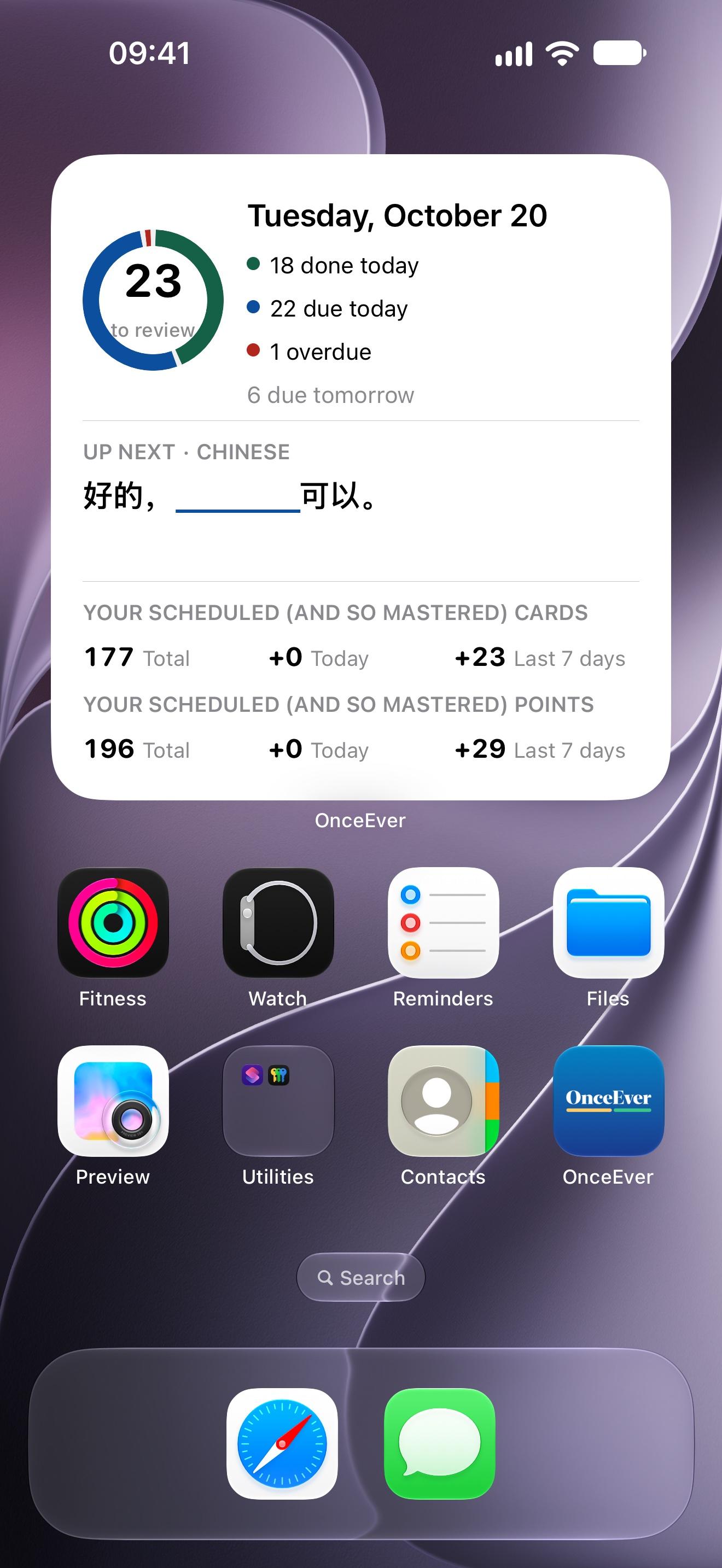
Widgets for your lock screen and home screen.

What’s due today, and the next phrase with its picked words blanked, to recall right there. Small, medium and large, and controls that start a review or a new card.
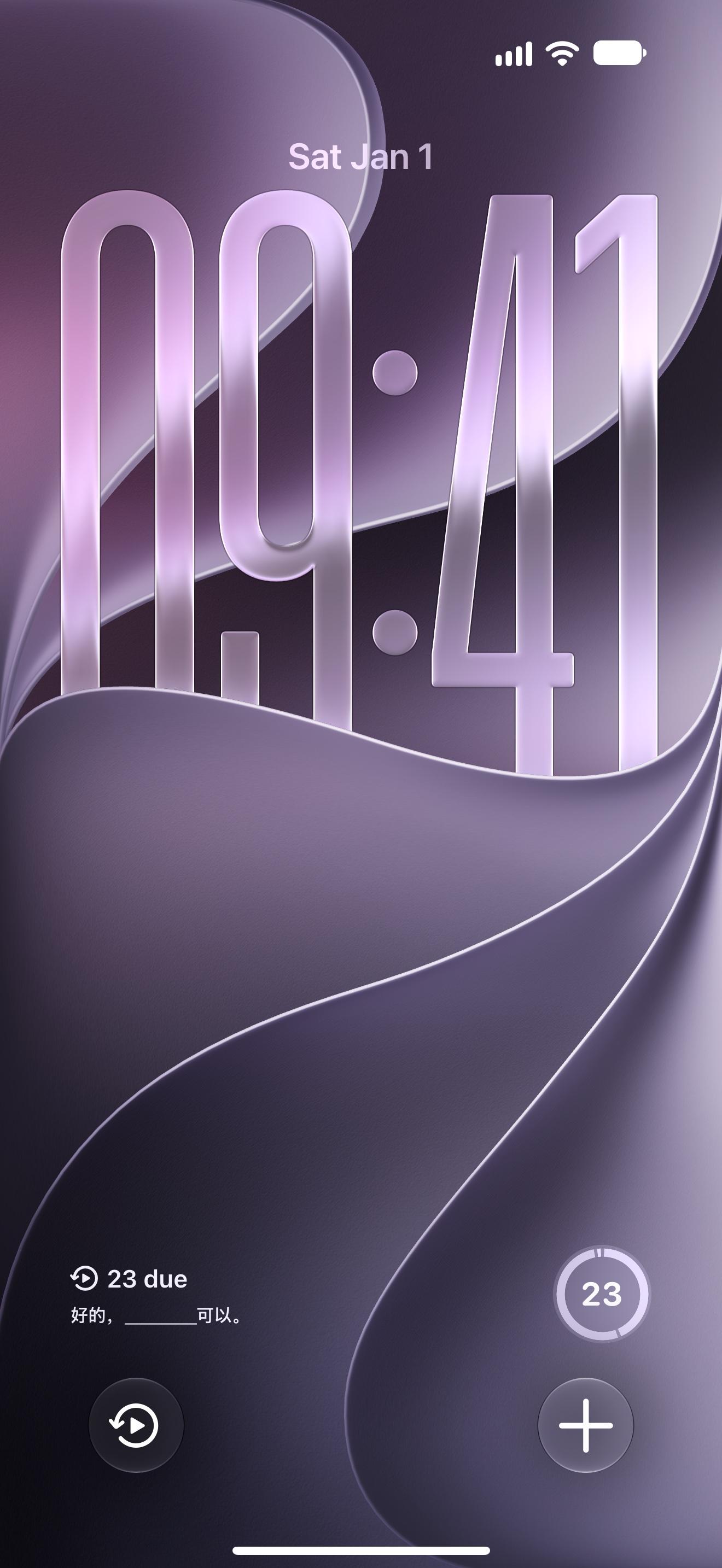
The lock screen: 23 due and a Chinese phrase with its blank, a ring of the day’s review, and controls for a review and a new card
The large widget on the home screen: 23 to review, 18 done today, 22 due and 1 overdue, and the next Chinese phrase with its blank
04
From the first words

Not only for the advanced. Beginners start here too.

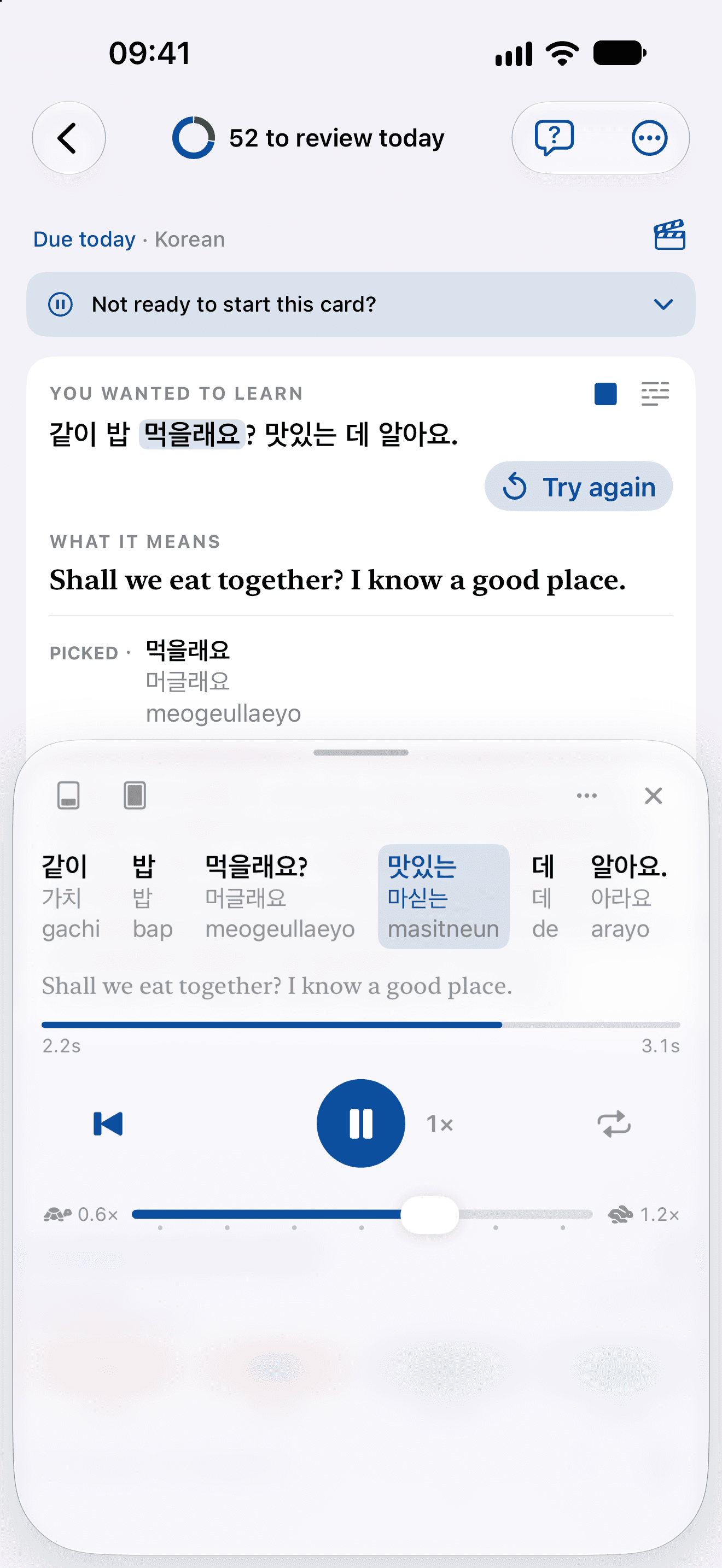
Everything written for you follows the level you set, and any phrase can be heard as slowly as you need, with how each word is said written under it.

0:00 / 0:00
Script. Read it, but never heard it? A card: you wanted to learn これ、一つください。, what it means: I'll have one of these, please.. Its speaker opens Listen: each word over how it is said, これ これ kore, 一つ ひとつ hitotsu, ください ください kudasai, the word being said lit, the meaning under it. Hear it as slowly as you need: the speed slid down to 0.6×, and it plays again. A queue behind you? Say it back first: Repeat, with time to say it back; the line, then Your turn — say it back. Bedtime, in their other language? A story kept in the Library, Bedtime Children's Story About a Little Bear, a translation under each line. Hear it a line at a time: a line's speaker, Había una vez una osita que no quería dormir. (Once upon a time, there was a little bear who didn't want to sleep.), each word over how it is said, Había /aˈbi.a/, una /ˈuna/, vez /beθ/, una /ˈuna/, osita /oˈsita/, que /ke/, no /no/, quería /keˈɾi.a/, dormir /doɾˈmiɾ/; then the next line's, —Todavía no tengo sueño —le dijo a su mamá. ("I'm not sleepy yet," she said to her mom.). Any word, heard alone: the whole height, Tap a word to hear it alone, at this speed. OnceEver. Hear it before you say it.

The readings under each word are what the app wrote for those lines, and the story’s title and translations what it wrote when the page was kept as a text.
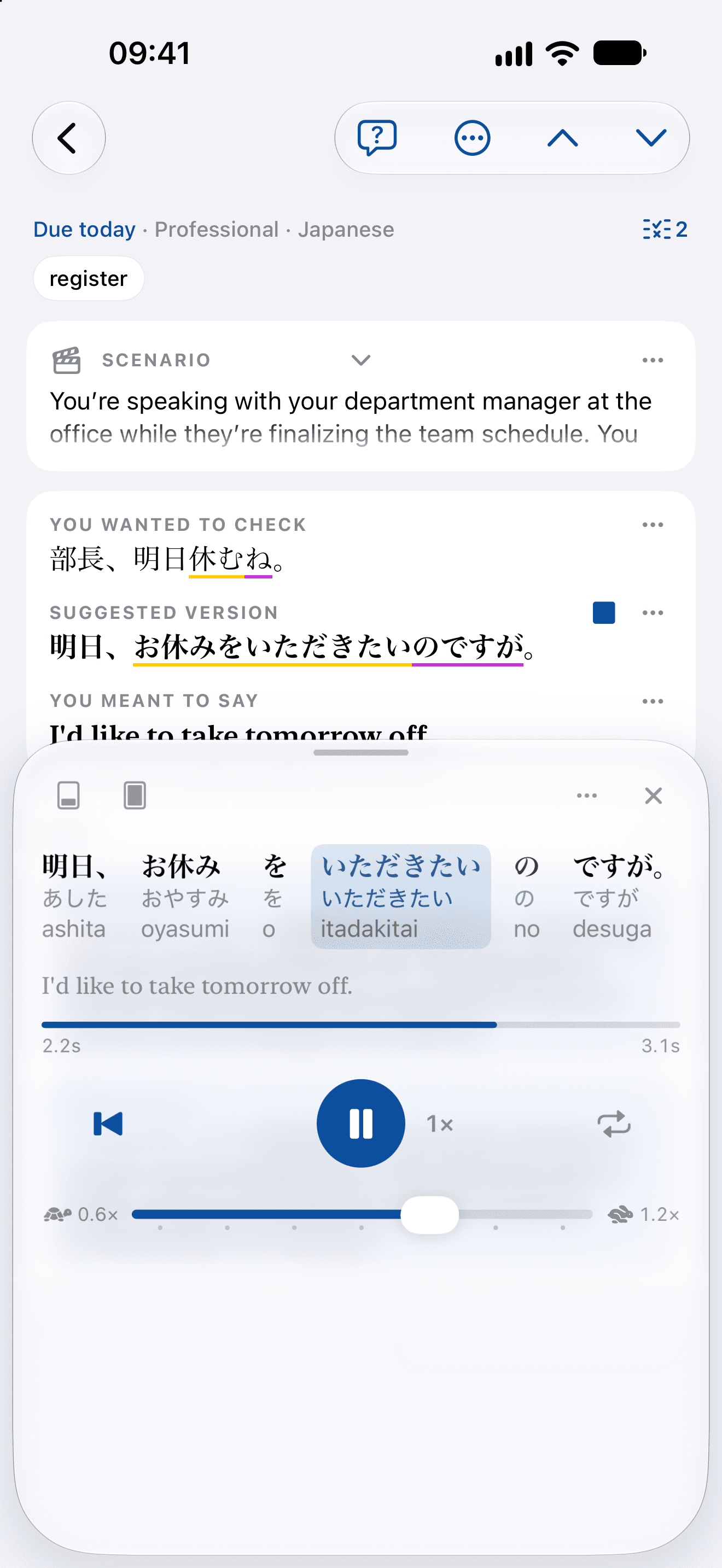
Listen on a Japanese card: each word over its kana and rōmaji, いただきたい lit as it is said, the speed slider at 1×
Japanese: each word over its kana and rōmaji, the word being said lit
Listen during a Korean review: each word over its pronunciation and romanization, 맛있는 lit as it is said
Korean, in the middle of a review: 맛있는 lit as it’s said
Your level, for each language
  1. A1
  2. A2
  3. B1
  4. B2
  5. C1
  6. C2
From A1 to C2, set for each language you learn, since being at ease in one says nothing about the next. Asked at A2, a sentence comes back in words an A2 learner can reach for.
How each word is said
Listen writes each word over its reading — kana, pinyin or IPA, with a romanization under Japanese and Korean — and lights the word being said. Tap one to hear it alone.
As slow as you need
From 0.6× to 1.2×, kept for each language, and a repeat that leaves you a turn to say it back.
05
Ways in

Keep it the moment you meet it.

The phrases worth having turn up while you’re busy with something else. Keep one without leaving what you were doing — or bring it in here, typed, spoken, photographed or pasted.
From a chat
0:00 / 0:00
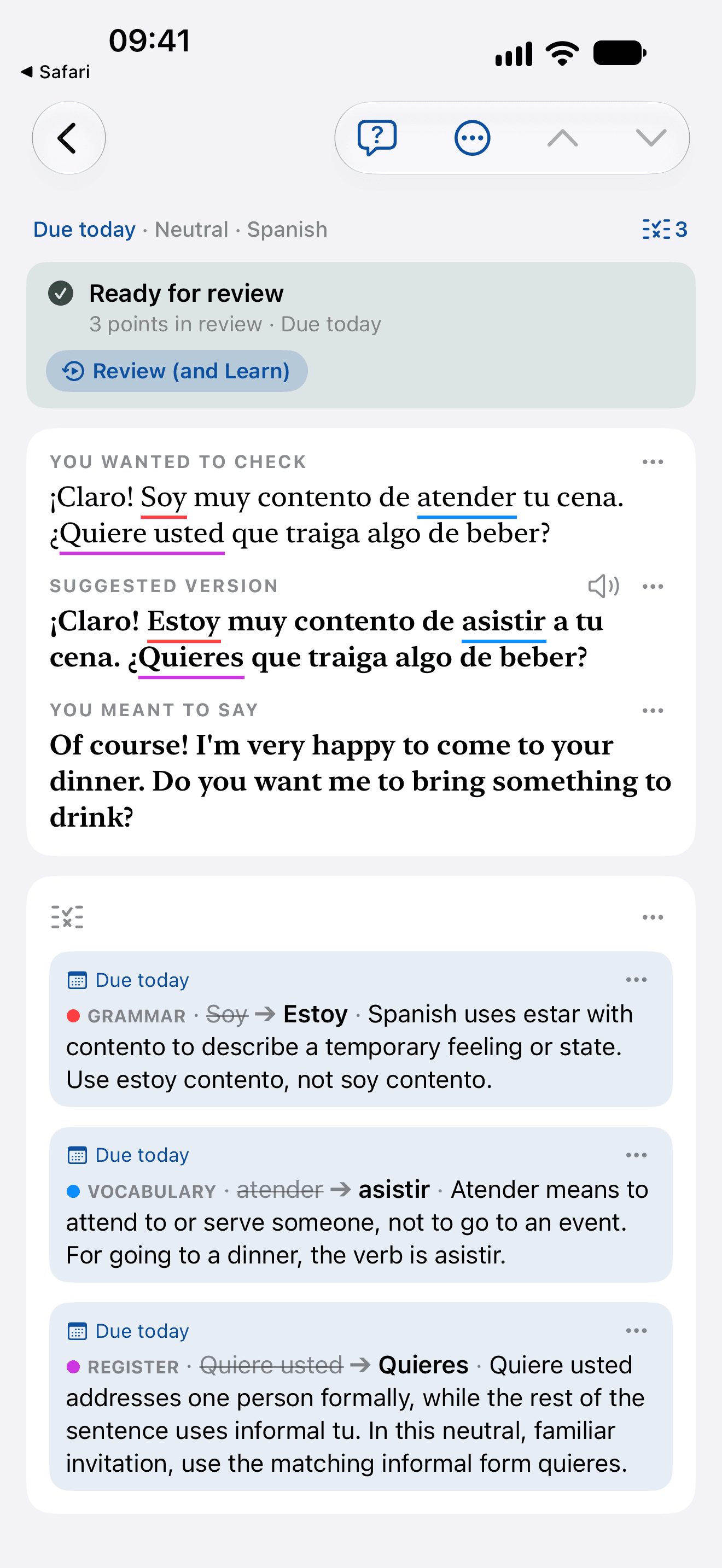
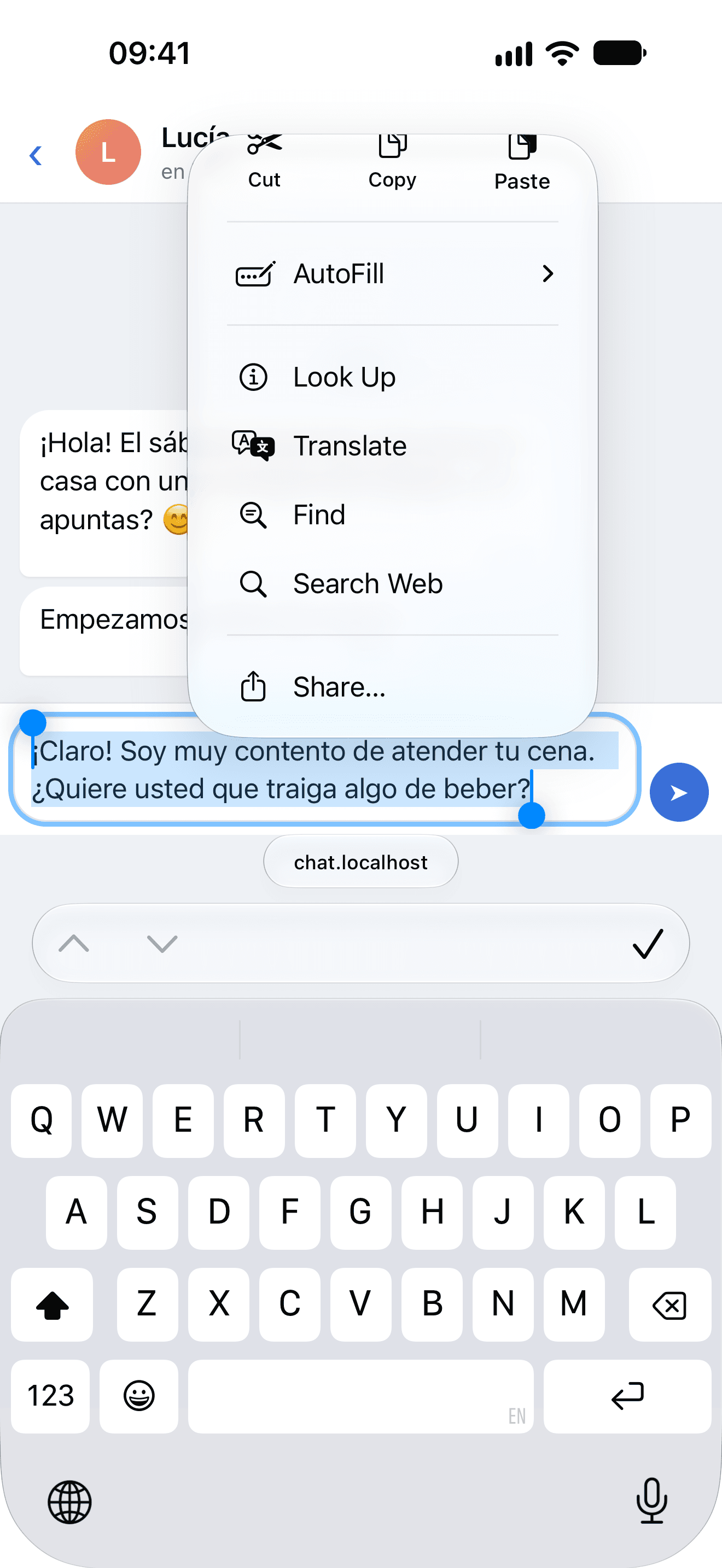
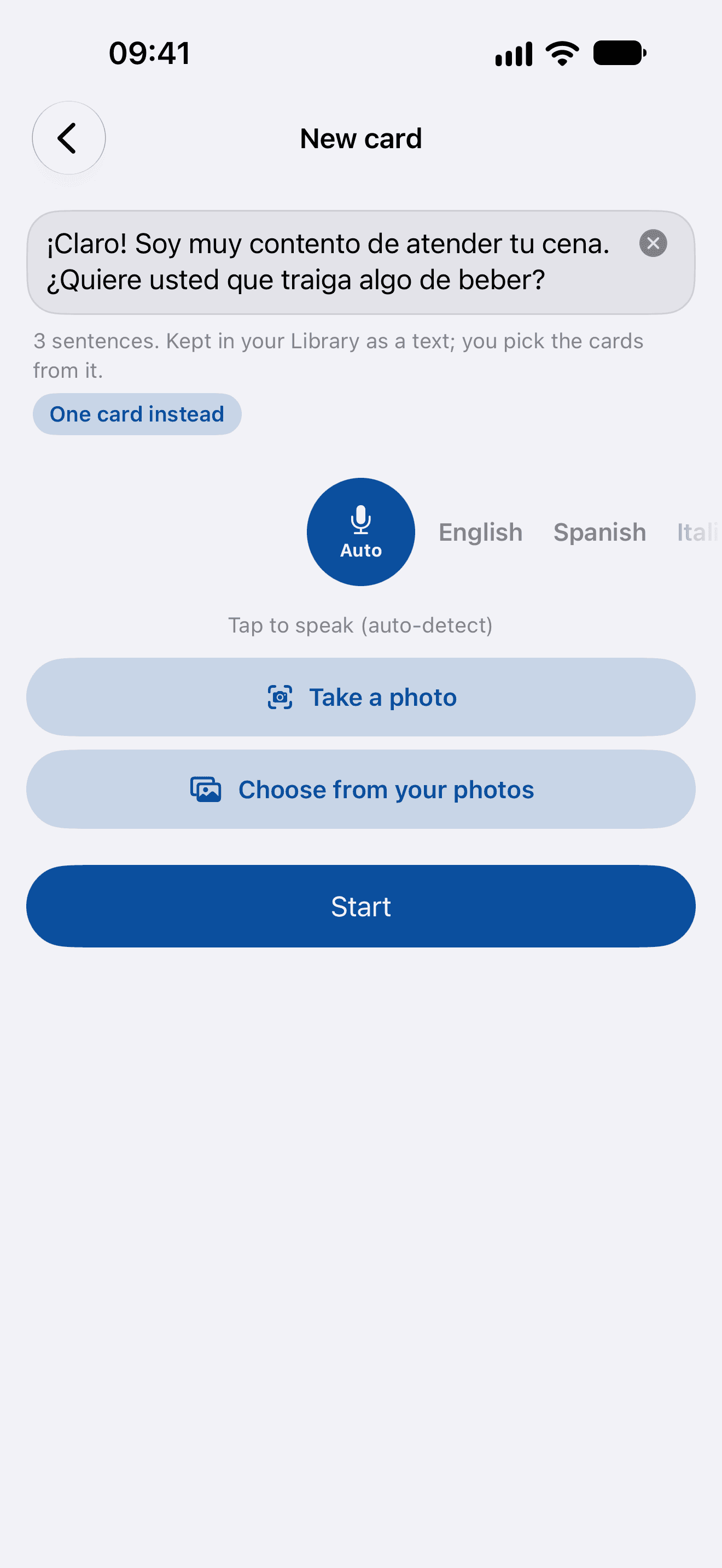
Script. A reply you're about to send? A chat with Lucía: ¡Claro! Soy muy contento de atender tu cena. ¿Quiere usted que traiga algo de beber?, selected, and Share in its menu. Share it first. It waits for you: OnceEver in the share sheet, then Your words are waiting. Open OnceEver to make the card. Done. New card has the words: 3 sentences: too much to learn as one card. Kept whole in your Library, where the sentences you choose each become a card of their own. One card instead: 3 sentences. One card. Start, Check my Spanish. Checked before you send it: the card, ready for review; you wanted to check ¡Claro! Soy muy contento de atender tu cena. ¿Quiere usted que traiga algo de beber?; suggested version: ¡Claro! Estoy muy contento de asistir a tu cena. ¿Quieres que traiga algo de beber?; you meant to say: Of course! I'm very happy to come to your dinner. Do you want me to bring something to drink?; Grammar, Soy to Estoy: Spanish uses estar with contento to describe a temporary feeling or state. Use estoy contento, not soy contento. Vocabulary, atender to asistir: Atender means to attend to or serve someone, not to go to an event. For going to a dinner, the verb is asistir. Register, Quiere usted to Quieres: Quiere usted addresses one person formally, while the rest of the sentence uses informal tu. In this neutral, familiar invitation, use the matching informal form quieres. Directions from your host? A message from Giulia: Ciao! Quando arrivi a Termini, prendi la metro A fino a Ottaviano. All'uscita gira a destra e cammina dritto per cinque minuti. Il portone è verde: citofona Bianchi e ti apro. Se ti perdi, chiamami! Share them, keep them as a text: shared the same way, New card has them, 5 sentences: too much to learn as one card. Kept whole in your Library, where the sentences you choose each become a card of their own. Start, Translate and Learn, Say it in English, Save to Library, Translating the text. The text: Text message with directions to an apartment; Hi! When you arrive at Termini, take metro A to Ottaviano. At the exit turn right and walk straight for five minutes. The front door is green: buzz Bianchi and I'll let you in. If you get lost, call me! Learn the words before you set off: gira a destra and citofona are picked, each sentence listed as its card will be, and Save to your cards. OnceEver. Keep it from any app.

The card’s three points and their reasons are the app’s own, as these screens show them; the host’s message’s title and translation are what the app wrote when it was kept as a text.

  1. A chat in Spanish: the learner’s reply to a friend still in the typing box, not sent, selected, with Share in its menu
    1Before you send it, select your message and tap Share
  2. New card with the message in it, three sentences it would keep in your Library as a text, and One card instead under them
    2Open OnceEver and New card has it: tap One card instead, then Check my Spanish
  3. The card, ready for review: the message marked, Soy to Estoy as grammar, atender to asistir as vocabulary and Quiere usted to Quieres as register, each with its reason and due today
    3Get it marked, then add what changed to review
From an article
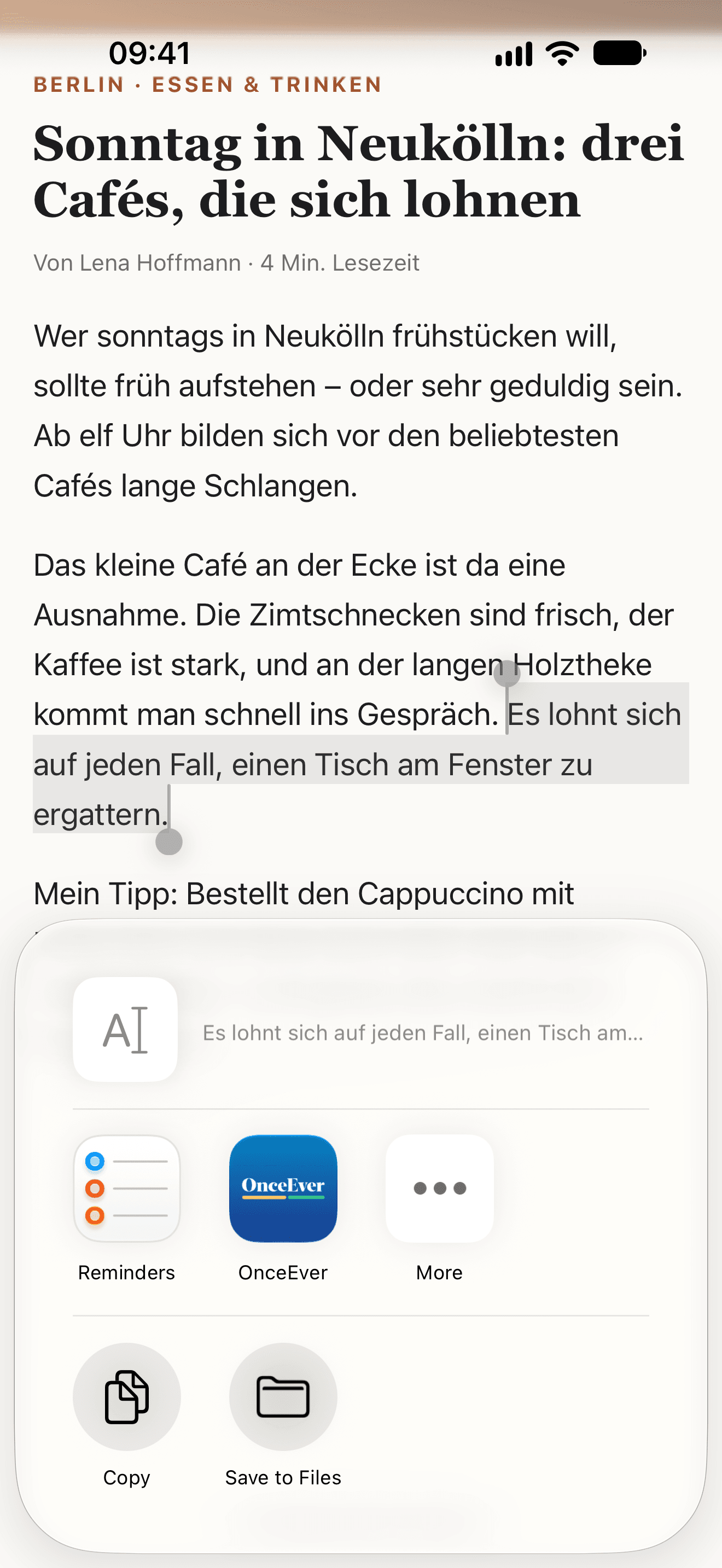
  1. A German article in Safari, one sentence selected and the share sheet open on OnceEver
    1In any app, select the words and tap Share
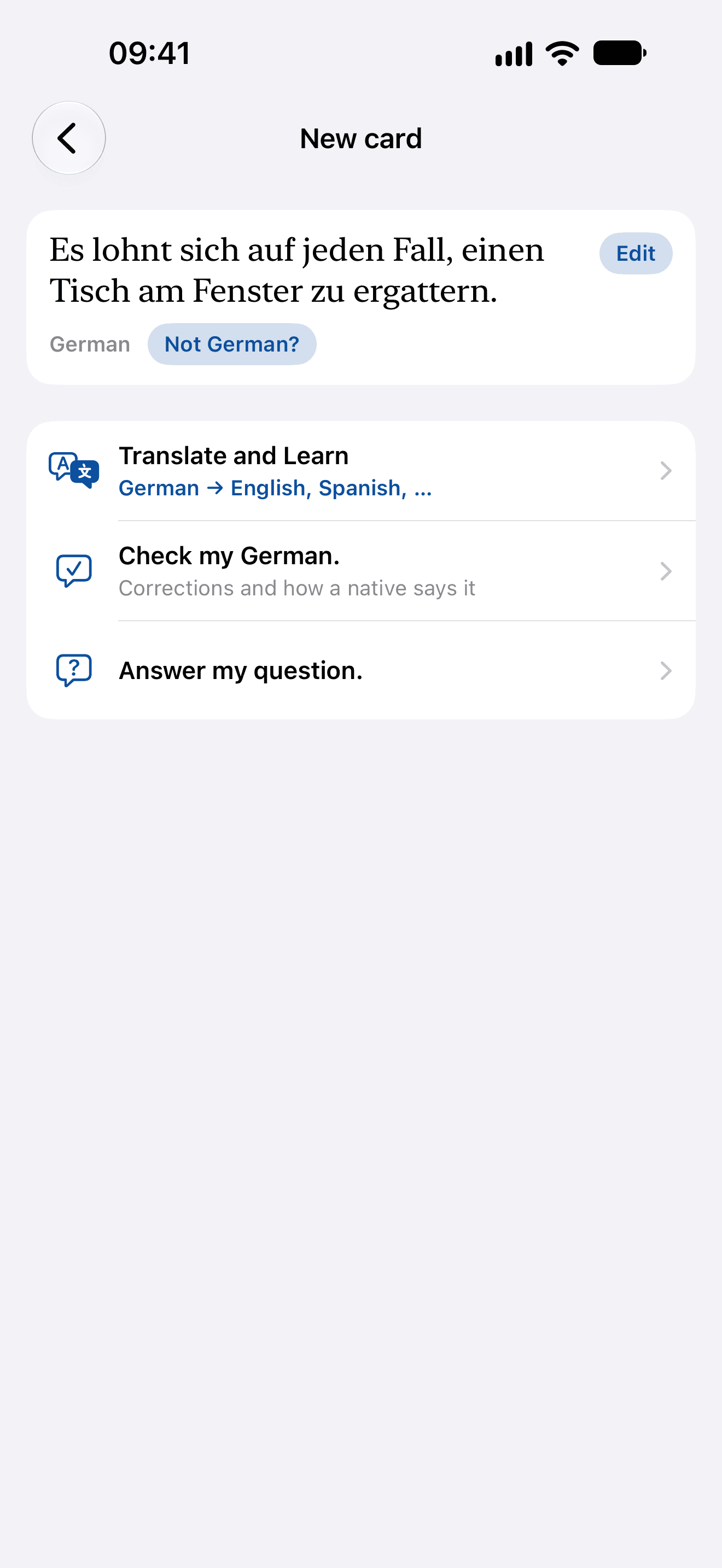
  2. New card with the German sentence in it, read as German, and its three ways: Translate and Learn, Check my German, Answer my question
    2Open OnceEver and New card has it: choose Translate and Learn
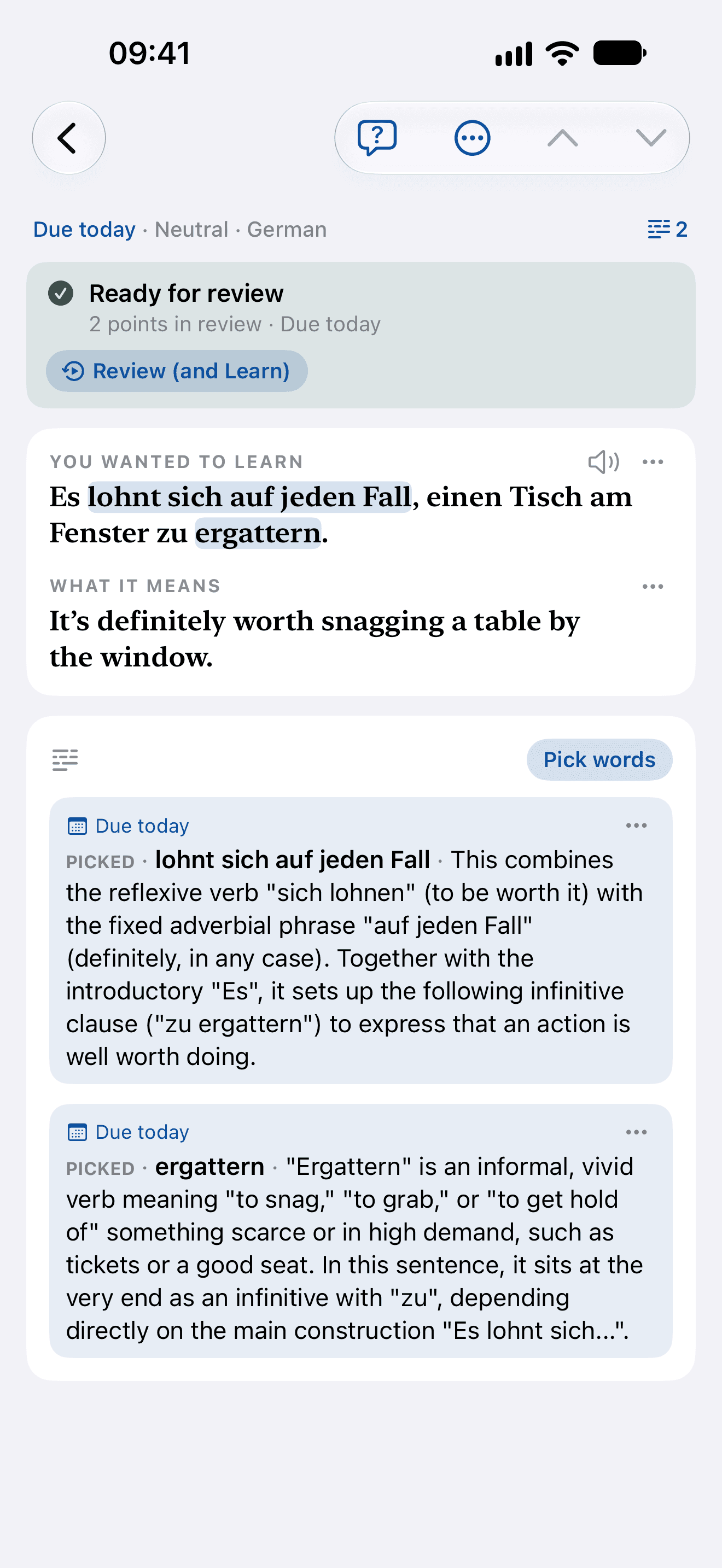
  3. The card, ready for review: the German sentence with lohnt sich auf jeden Fall and ergattern picked, what it means in English, and each picked group explained
    3Pick the words worth keeping, and have them explained
Typed in your language
0:00 / 0:00
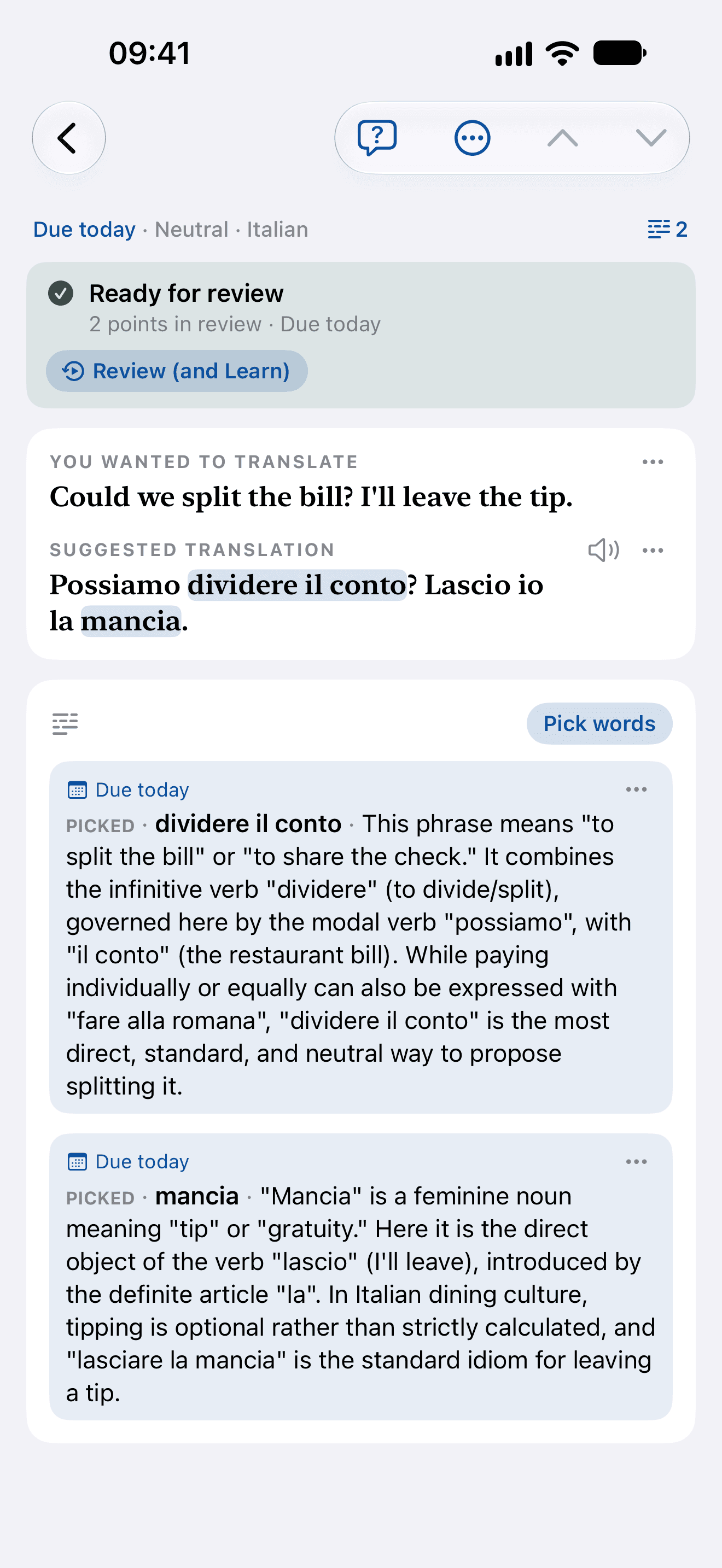
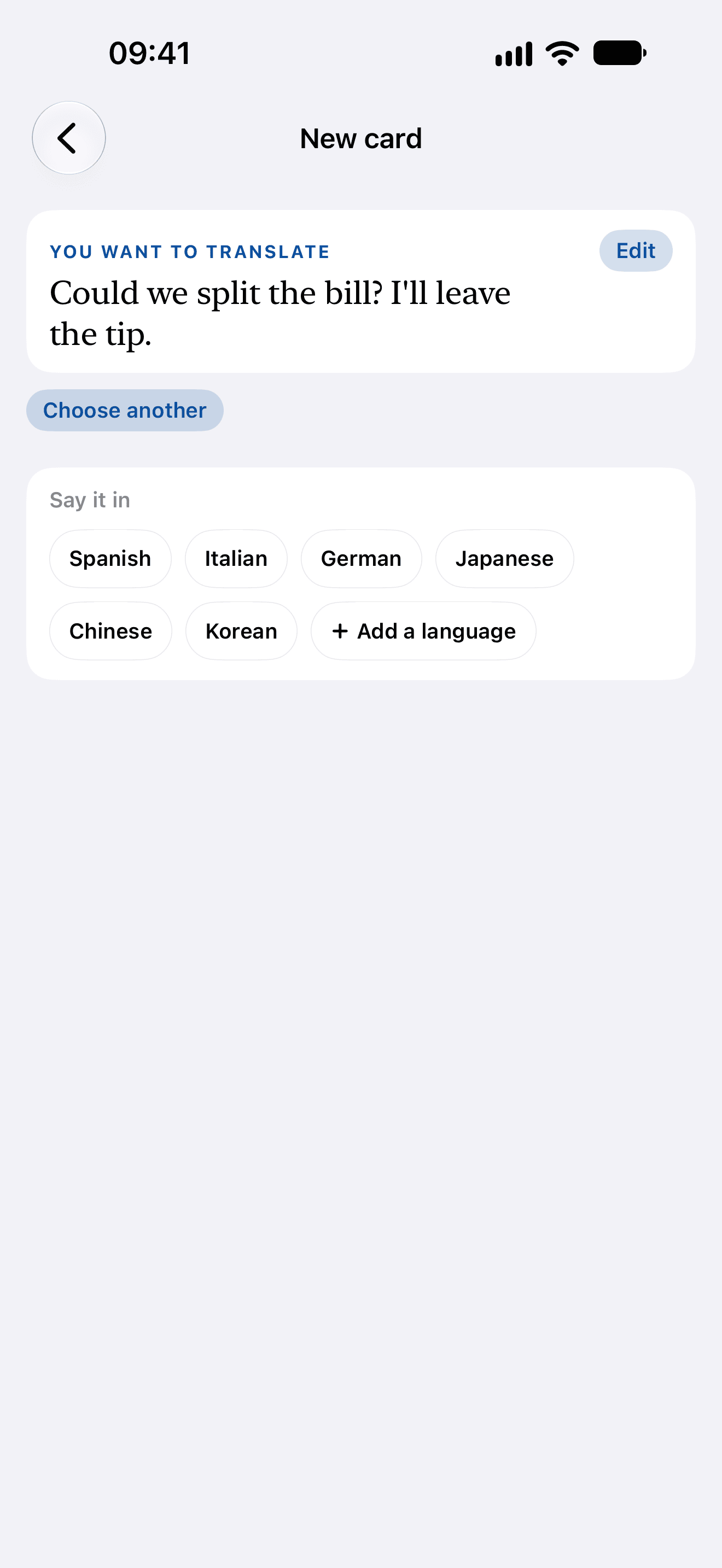
Script. You know what you want to say, just not how. Type it in your own language: Could we split the bill? I'll leave the tip. is typed into New card's box, which reads it as 2 sentences, one card; then Start. Choose the language to say it in: you want to translate it, and Say it in offers Spanish, Italian, German, Japanese, Chinese and Korean; Italian is tapped. The card writes it in Italian: the card is born a draft, not translated into Italian yet; Translate into Italian is pressed, and the suggested translation types in: Possiamo dividere il conto? Lascio io la mancia. Pick the words you want to learn: Pick words, a sweep across dividere il conto, a touch on mancia, Add to card; the card is ready for review, two points due today. Explained when you ask: Explain writes what each pick is doing. dividere il conto: This phrase means "to split the bill" or "to share the check." It combines the infinitive verb "dividere" (to divide/split), governed here by the modal verb "possiamo", with "il conto" (the restaurant bill). While paying individually or equally can also be expressed with "fare alla romana", "dividere il conto" is the most direct, standard, and neutral way to propose splitting it. mancia: "Mancia" is a feminine noun meaning "tip" or "gratuity." Here it is the direct object of the verb "lascio" (I'll leave), introduced by the definite article "la". In Italian dining culture, tipping is optional rather than strictly calculated, and "lasciare la mancia" is the standard idiom for leaving a tip. OnceEver. From your language into theirs.

The Italian and the two explanations are what the app wrote for that sentence: a Translate and Learn card, Neutral, explained in English.
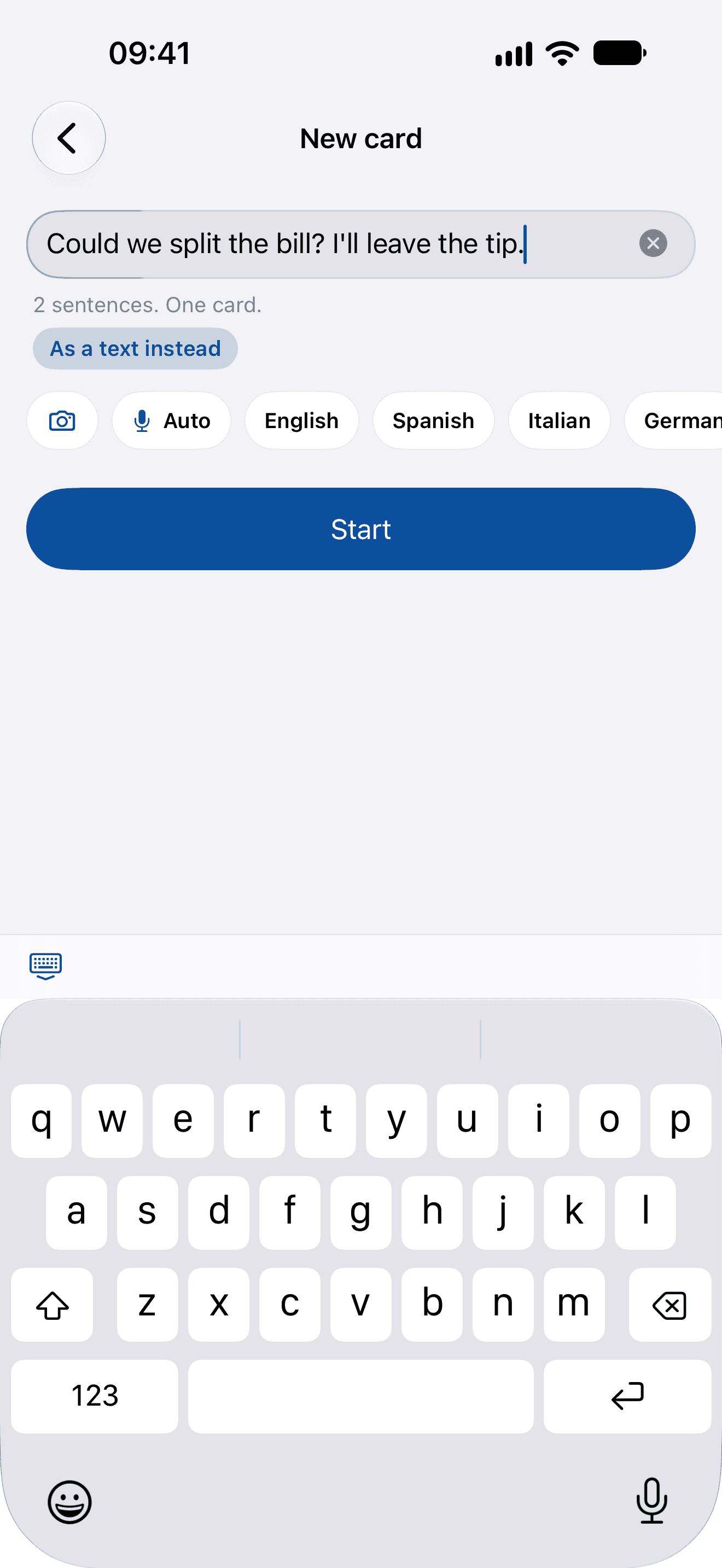
  1. New card with an English sentence typed in, Could we split the bill? I’ll leave the tip., read as two sentences and one card, the keyboard up
    1Type what you want to say, the way you’d say it
  2. Translate and Learn asking which language to say it in: Spanish, Italian, German, Japanese, Chinese or Korean
    2Choose Translate and Learn, and the language to say it in
  3. The card, ready for review: Possiamo dividere il conto? Lascio io la mancia., with dividere il conto and mancia picked and each explained
    3Pick the words worth keeping, and have them explained
From a photo
0:00 / 0:00
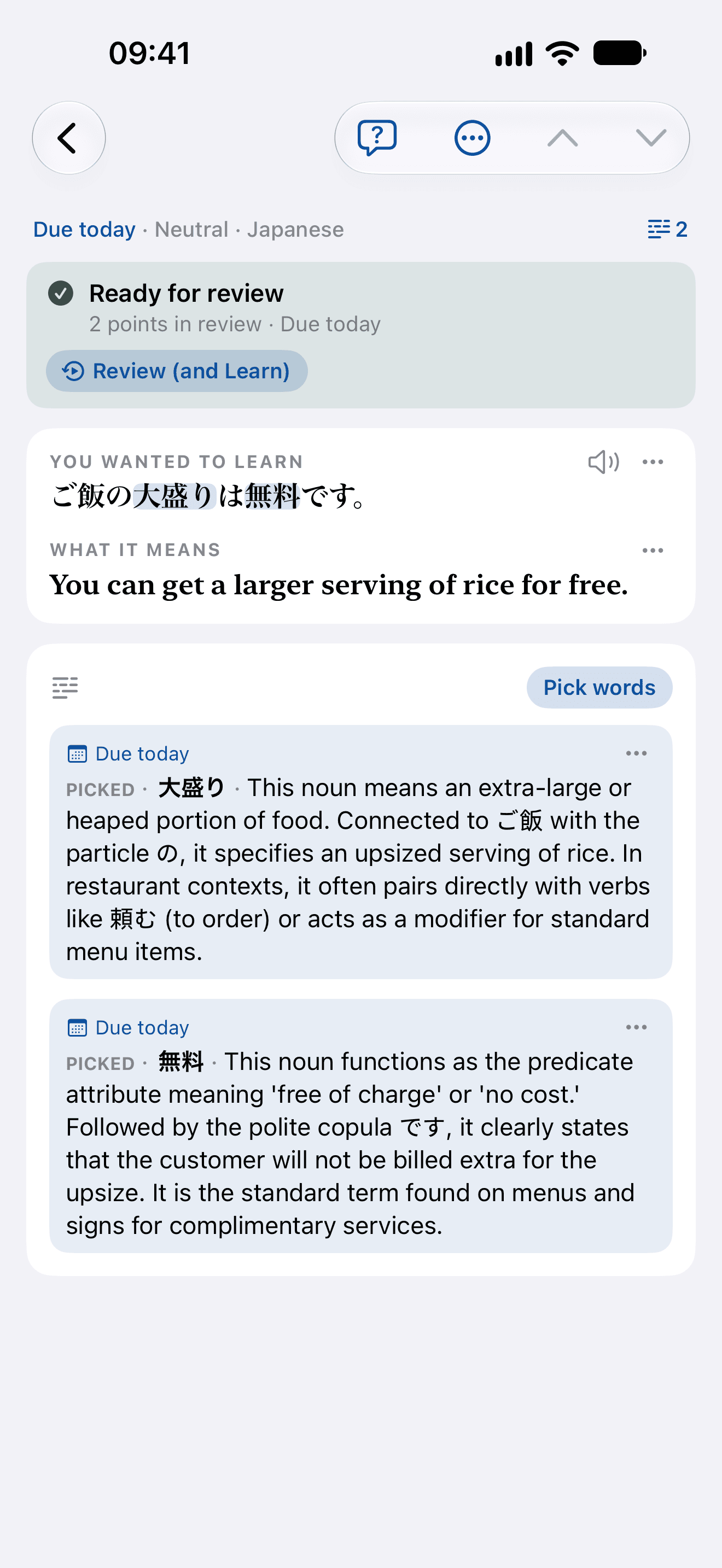
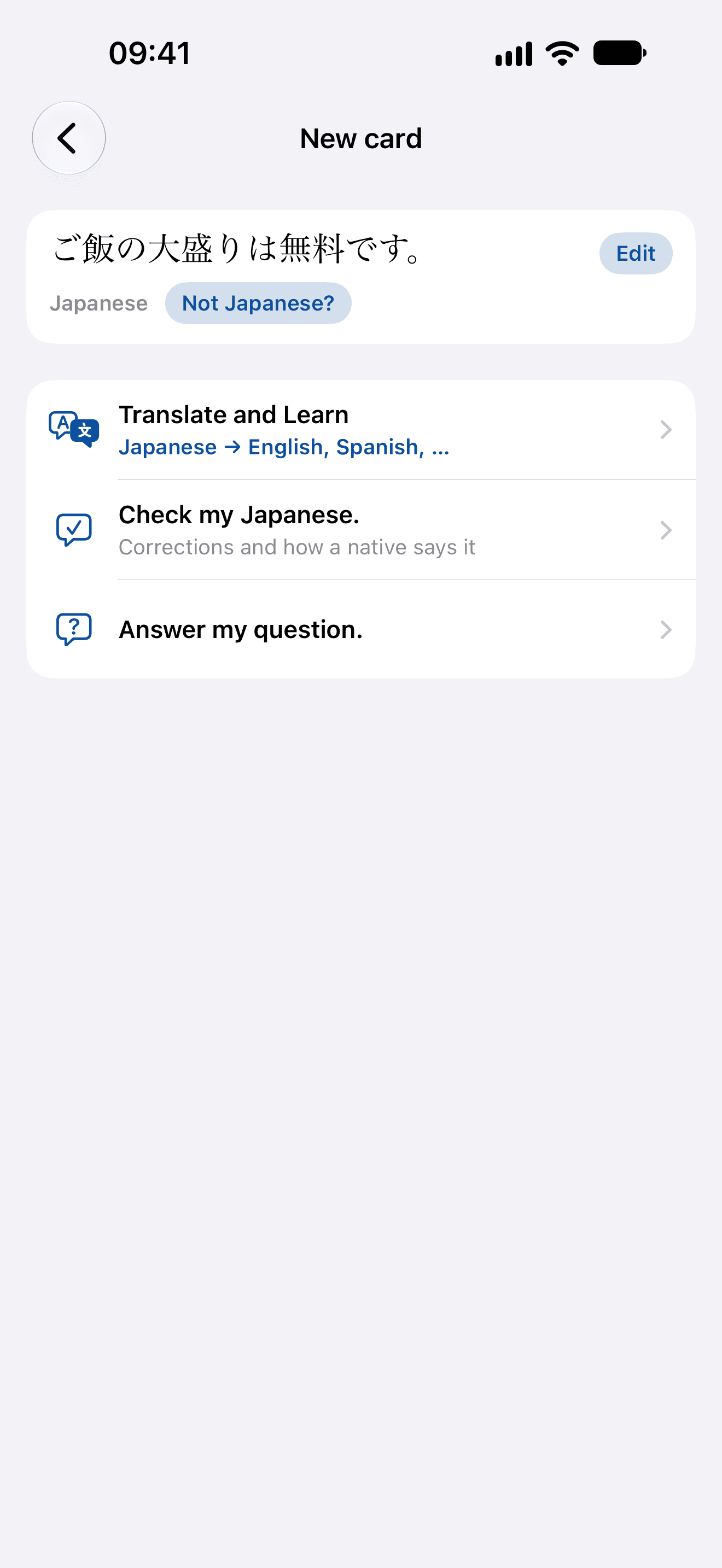
Script. A menu you can't read? New card, Choose from your photos, a photo of a lunch menu. Photograph it, keep the line: Pick the sentences offers the menu's lines, ご飯の大盛りは無料です。 is chosen, Use these. Its words, explained: the card, ready for review; you wanted to learn ご飯の大盛りは無料です。, what it means: You can get a larger serving of rice for free.; picked: 大盛り: This noun means an extra-large or heaped portion of food. Connected to ご飯 with the particle の, it specifies an upsized serving of rice. In restaurant contexts, it often pairs directly with verbs like 頼む (to order) or acts as a modifier for standard menu items. 無料: This noun functions as the predicate attribute meaning 'free of charge' or 'no cost.' Followed by the polite copula です, it clearly states that the customer will not be billed extra for the upsize. It is the standard term found on menus and signs for complimentary services. A whole letter? Keep it as a text: a photo of a letter from the landlord, Use the whole page as a text; New card keeps its 70 words as a text; Start, Translate and Learn, Say it in English, Save to Library, Translating the text. Translated, line by line: Berlin, den 10.11.2026 (Berlin, November 10, 2026) Ablesung der Heizkostenverteiler (Reading of heat cost allocators) Sehr geehrte Frau Weber, am Donnerstag, dem 20.11., kommt zwischen 8 und 12 Uhr ein Techniker, um die Heizkostenverteiler in allen Wohnungen abzulesen. (Dear Ms. Weber, on Thursday, November 20, a technician will come between 8:00 AM and 12:00 PM to read the heat cost allocators in all apartments.) Bitte sorgen Sie dafür, dass alle Heizkörper frei zugänglich sind. (Please ensure that all radiators are freely accessible.) Falls Sie an diesem Tag verhindert sind, geben Sie mir bitte bis Montag Bescheid, damit wir einen anderen Termin vereinbaren können. (If you are unable to make it on this day, please let me know by Monday so that we can arrange an alternative appointment.) Vielen Dank für Ihr Verständnis. (Thank you very much for your understanding.) Mit freundlichen Grüßen (Sincerely,) Dieter Meyer (Dieter Meyer) Learn the words every letter uses: frei zugänglich, verhindert and Termin vereinbaren are picked, each sentence listed as its card will be, and Save to your cards. OnceEver. Learn from what's in front of you.

The menu’s card is the one these screens show; the letter’s translations are what the app wrote when its whole page was kept as a text. Both are word for word.
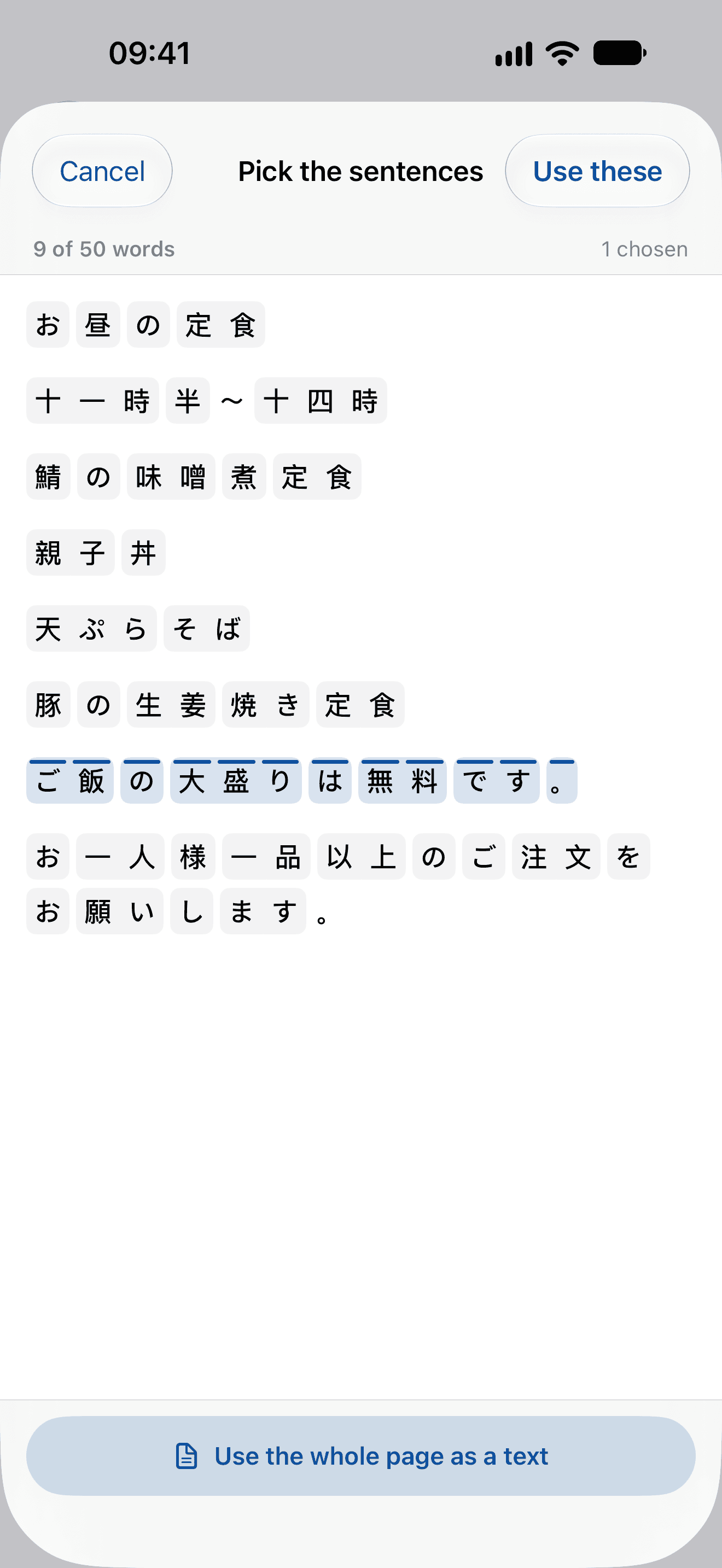
  1. The lines read from a photographed Japanese lunch menu, ご飯の大盛りは無料です。 chosen among them, and Use the whole page as a text under them
    1Photograph a menu or a sign, and touch the line you want
  2. New card with the menu’s line in it, read as Japanese, and its three ways: Translate and Learn, Check my Japanese, Answer my question
    2OnceEver reads it as Japanese: choose Translate and Learn
  3. The card, ready for review: ご飯の大盛りは無料です。, You can get a larger serving of rice for free., with 大盛り and 無料 picked and each explained
    3Pick the words worth keeping, and have them explained
A question
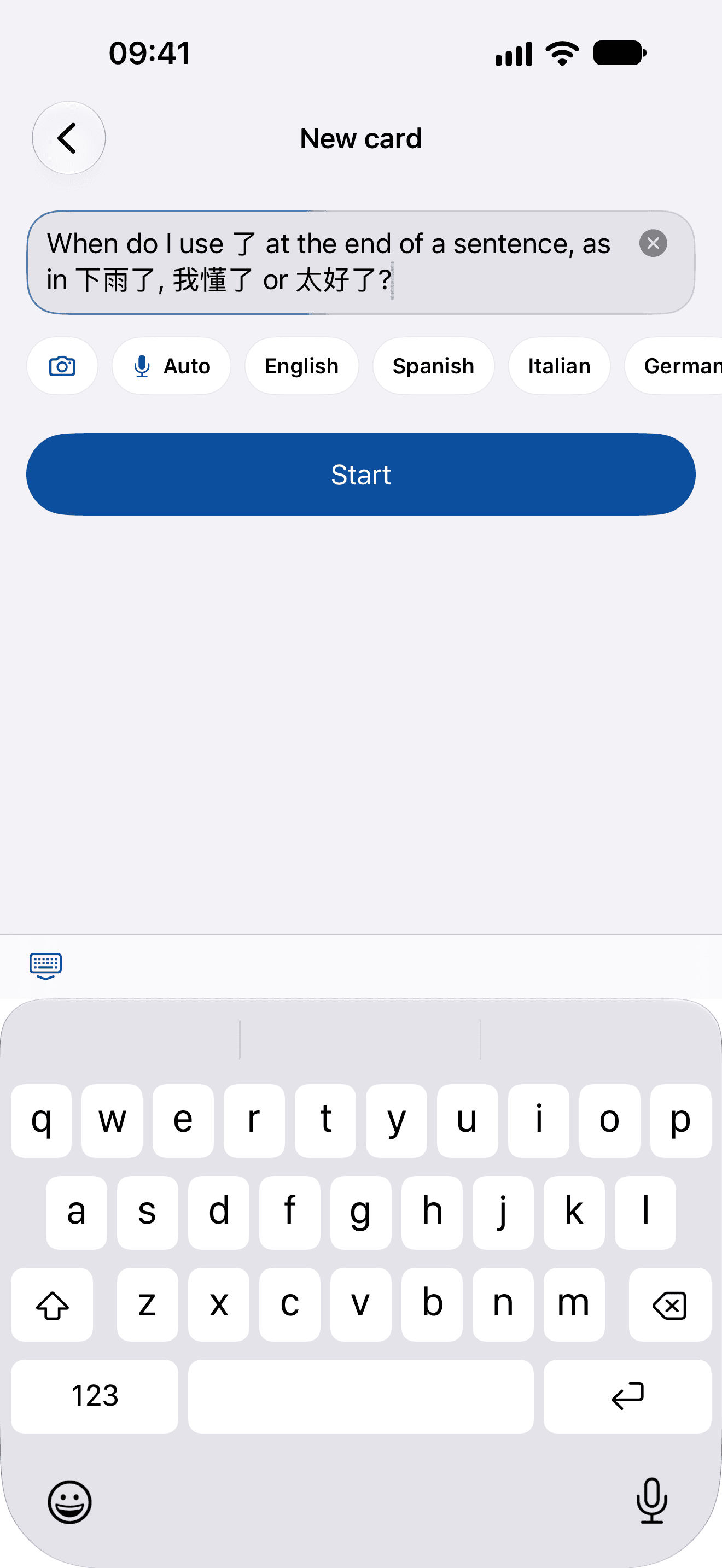
  1. New card with a question typed in English: When do I use 了 at the end of a sentence, as in 下雨了, 我懂了 or 太好了?
    1Ask what you’ve been wondering, in your own words
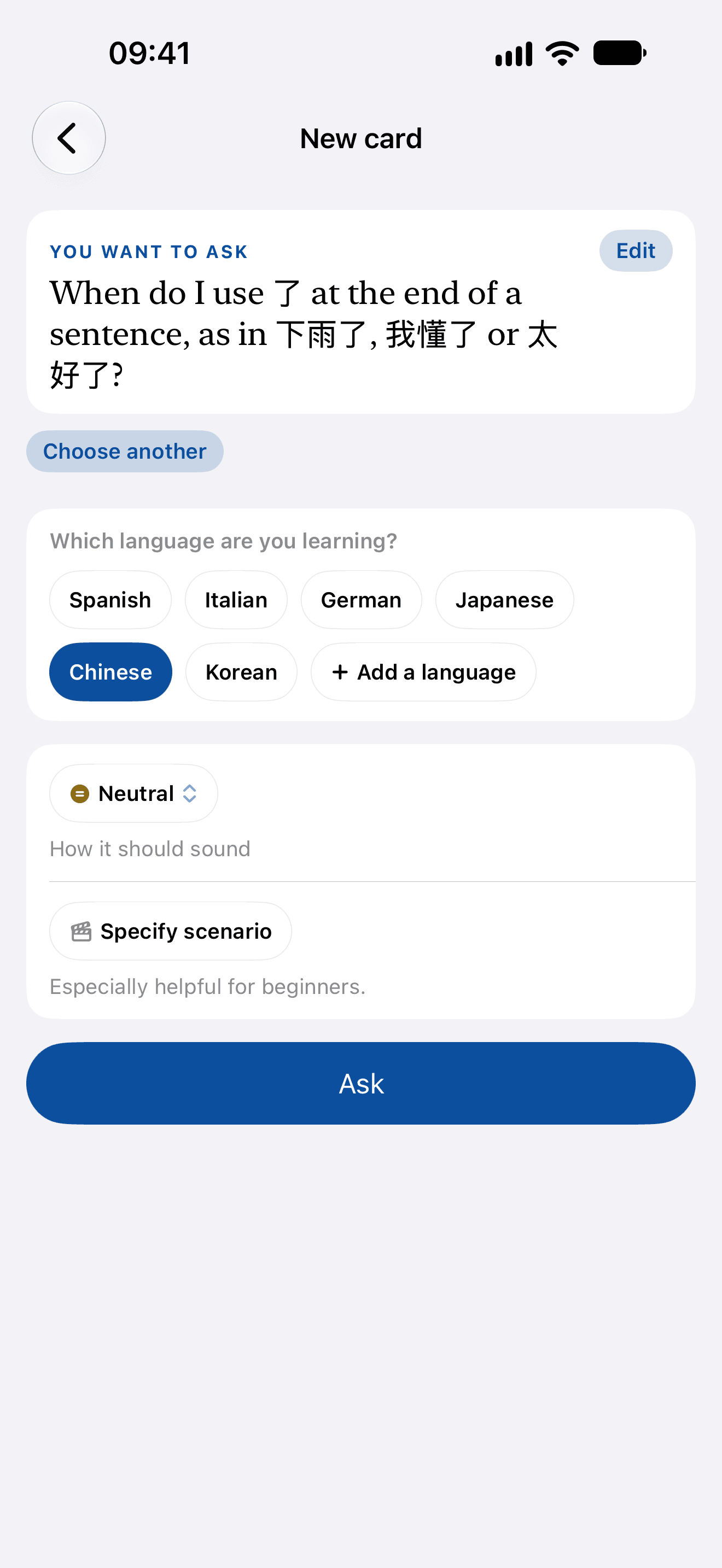
  2. Answer my question asking which language you’re learning, Chinese chosen, and Ask
    2Choose Answer my question, and the language it’s about
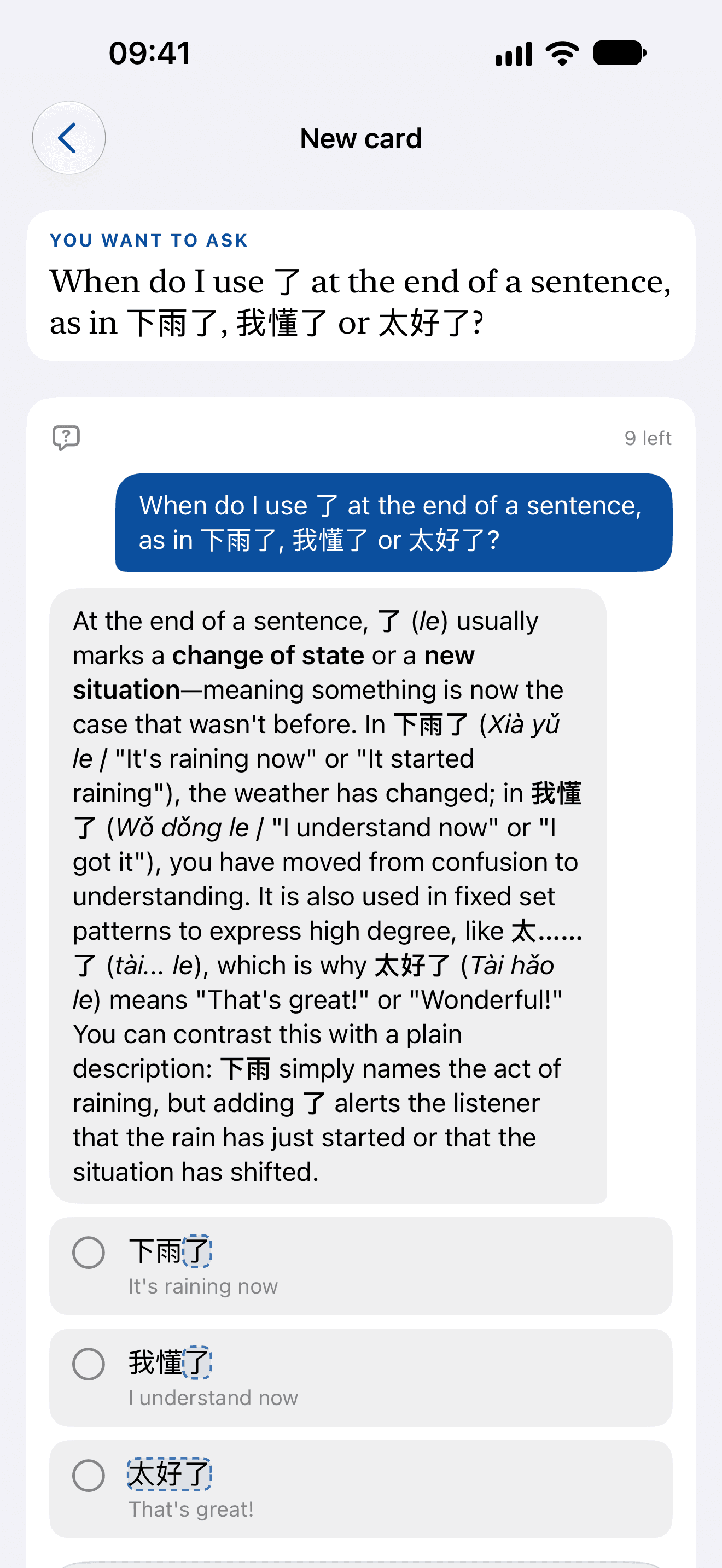
  3. The answer: a sentence-final 了 marks a change of state or a new situation, with 下雨了, 我懂了 and 太好了 as examples to keep
    3Get the answer, with examples you can keep
Said aloud
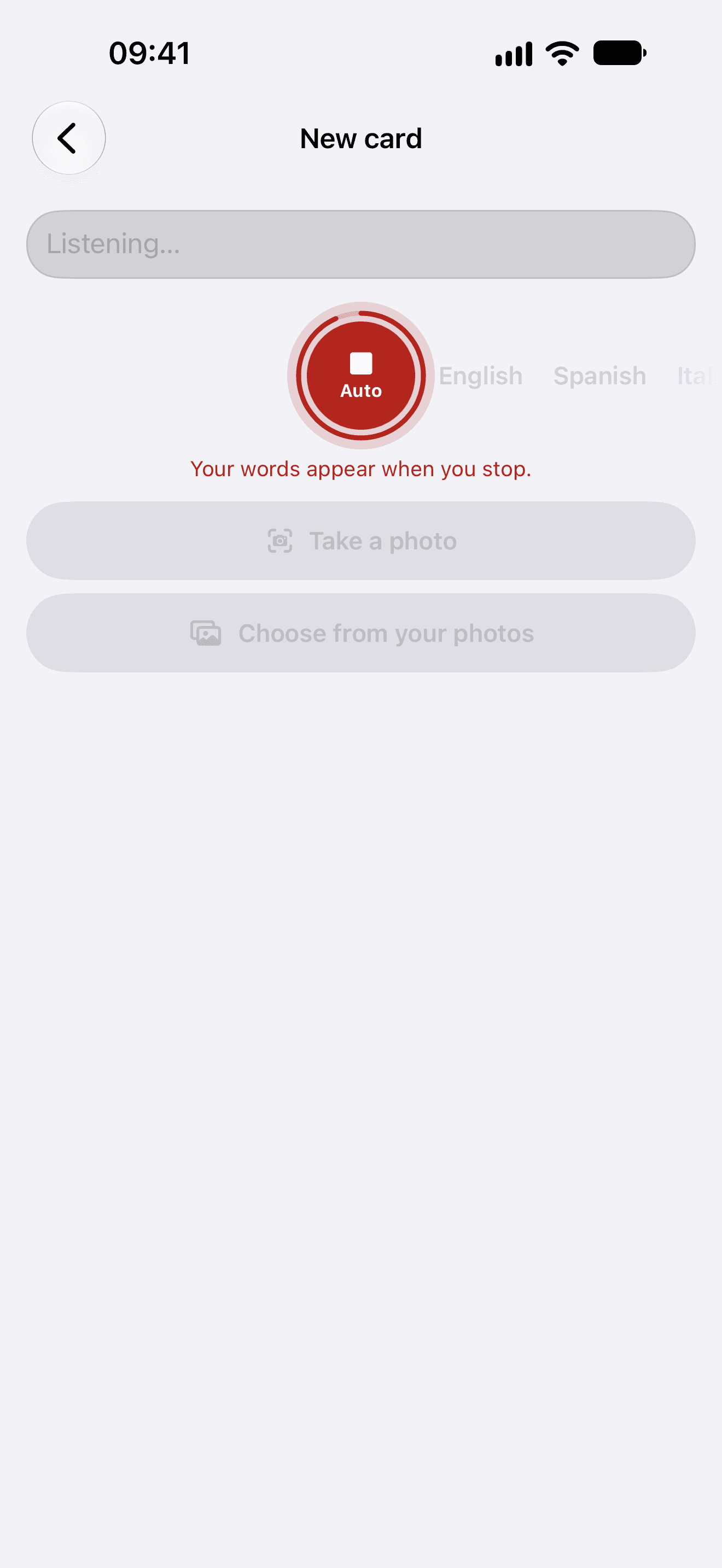
  1. New card listening, its mic red: your words appear when you stop
    1Tap the mic and say it
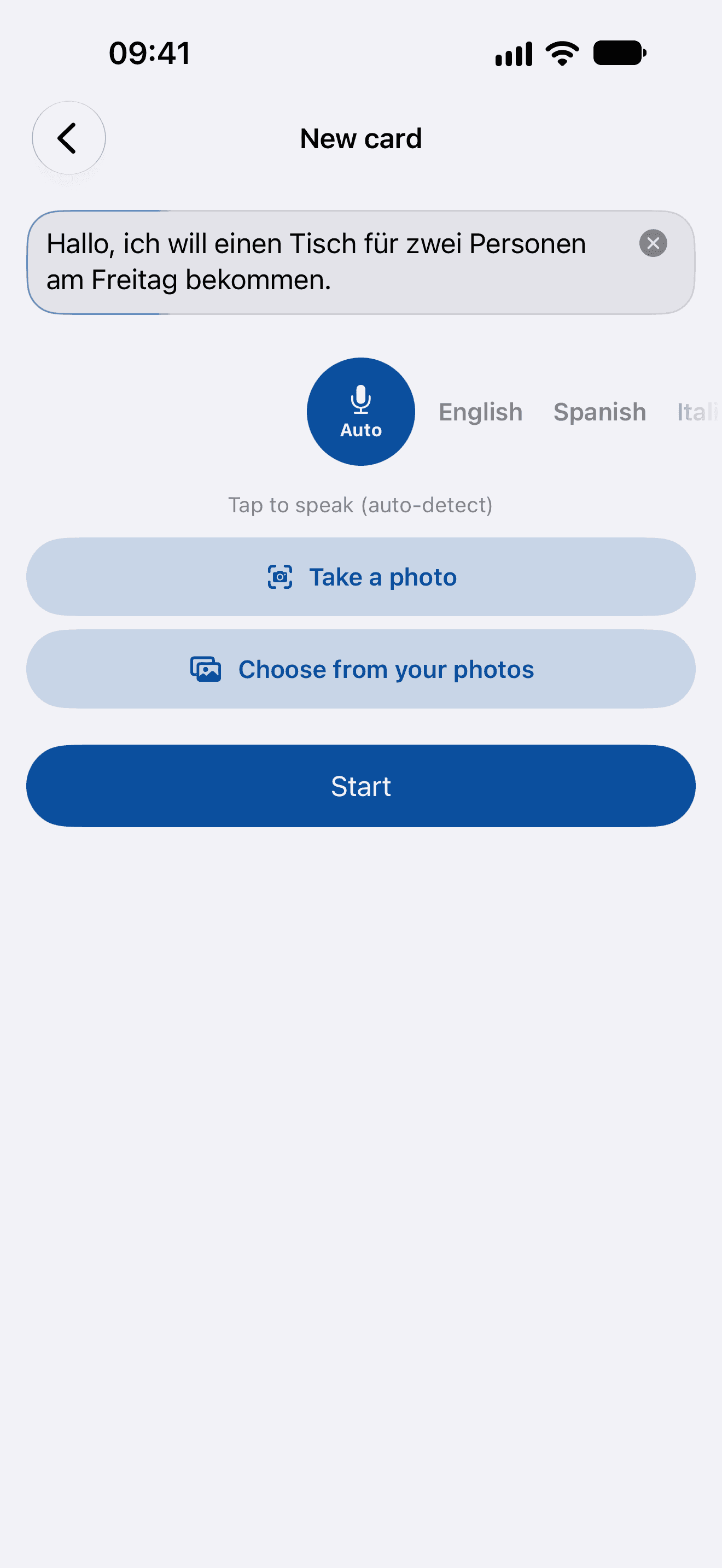
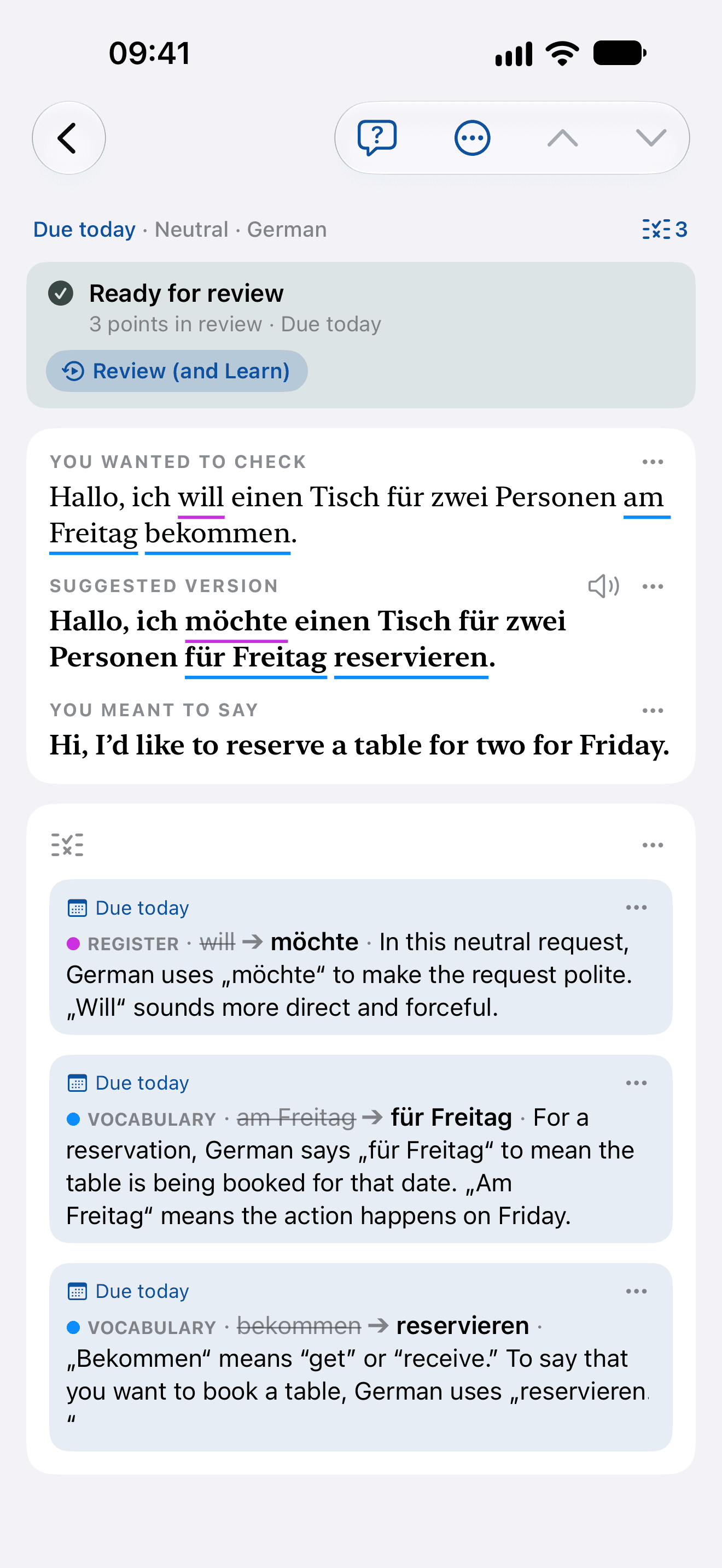
  2. New card with the take written out: Hallo, ich will einen Tisch für zwei Personen am Freitag bekommen.
    2It’s written out as you said it, in the language it heard
  3. The card, ready for review: will to möchte as register, am Freitag to für Freitag and bekommen to reservieren as vocabulary, each with its reason
    3Choose Check my German, and get it marked

Say it, type it, or photograph it.

Every box takes your voice and hears which language you speak. A sign or a page can be photographed instead.
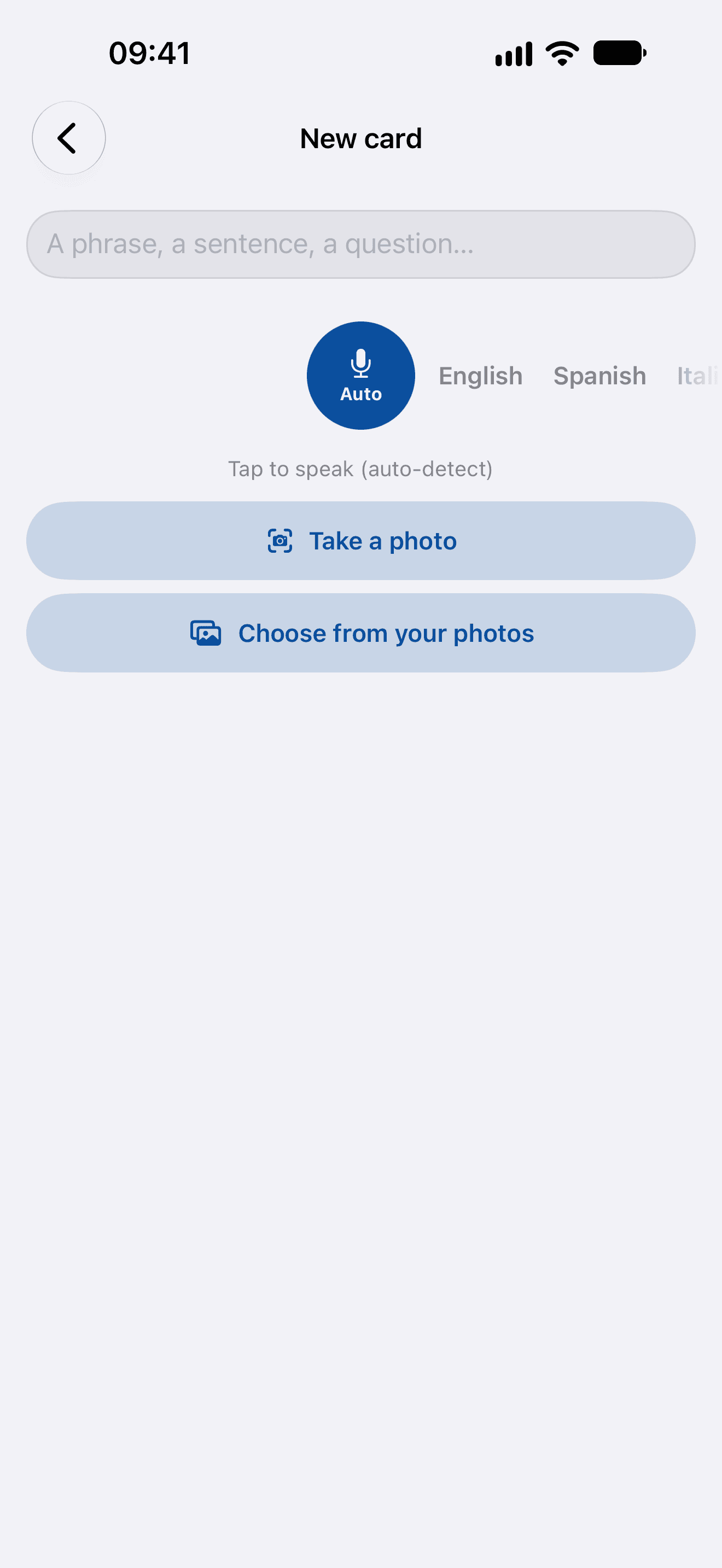
New card: a box to type in, a microphone over its dial of languages that hears which language you speak, and two ways in by photo: Take a photo and Choose from your photos

Say how it should sound.

Ask how to say it, choose who it’s for, and add where you are: the answer is written for that.
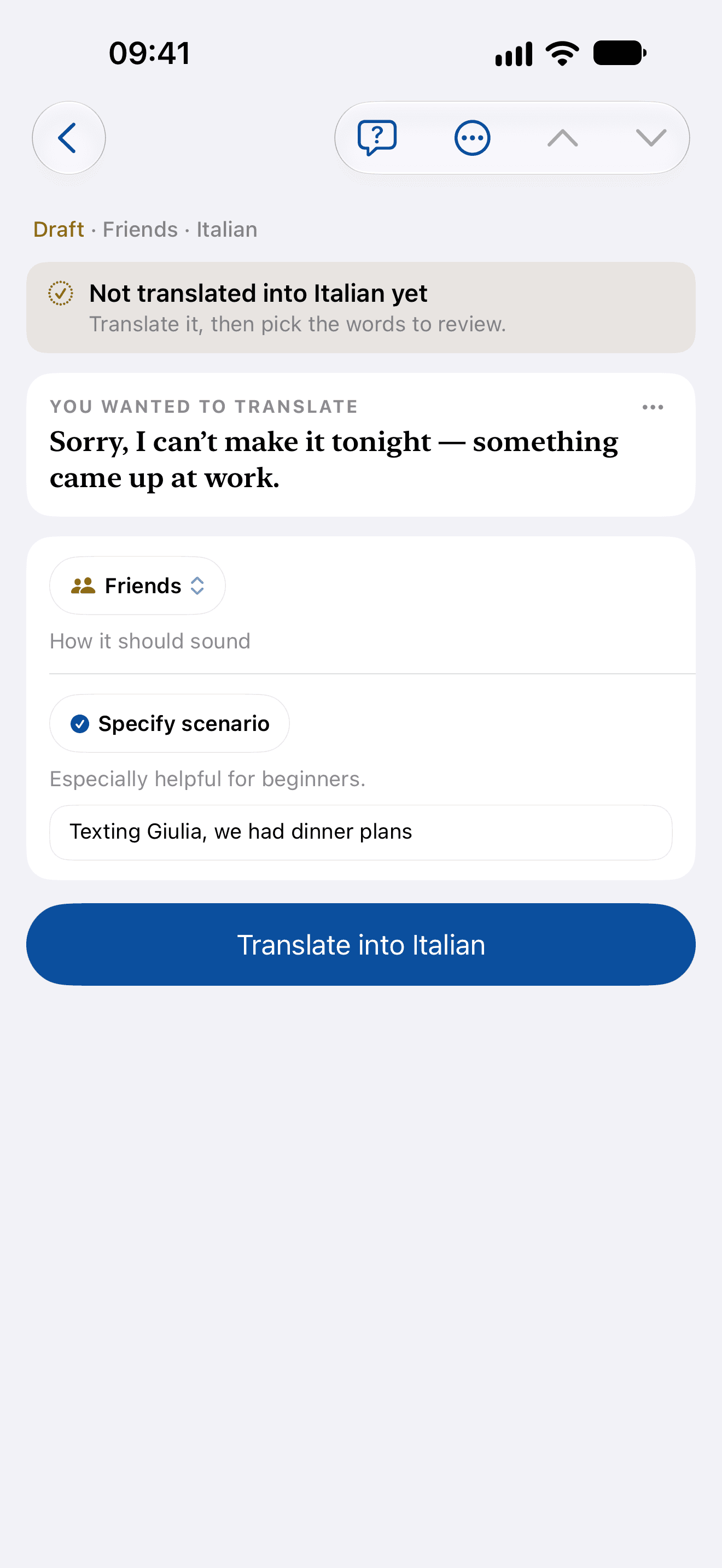
Quick, asked how to say a sentence in Italian: how it should sound set to Friends, and a scenario, texting Giulia

Keep whole texts to pick from.

Paste an article or an email into your Library, beside the texts Ideas wrote for you, and pick from it whenever you like.
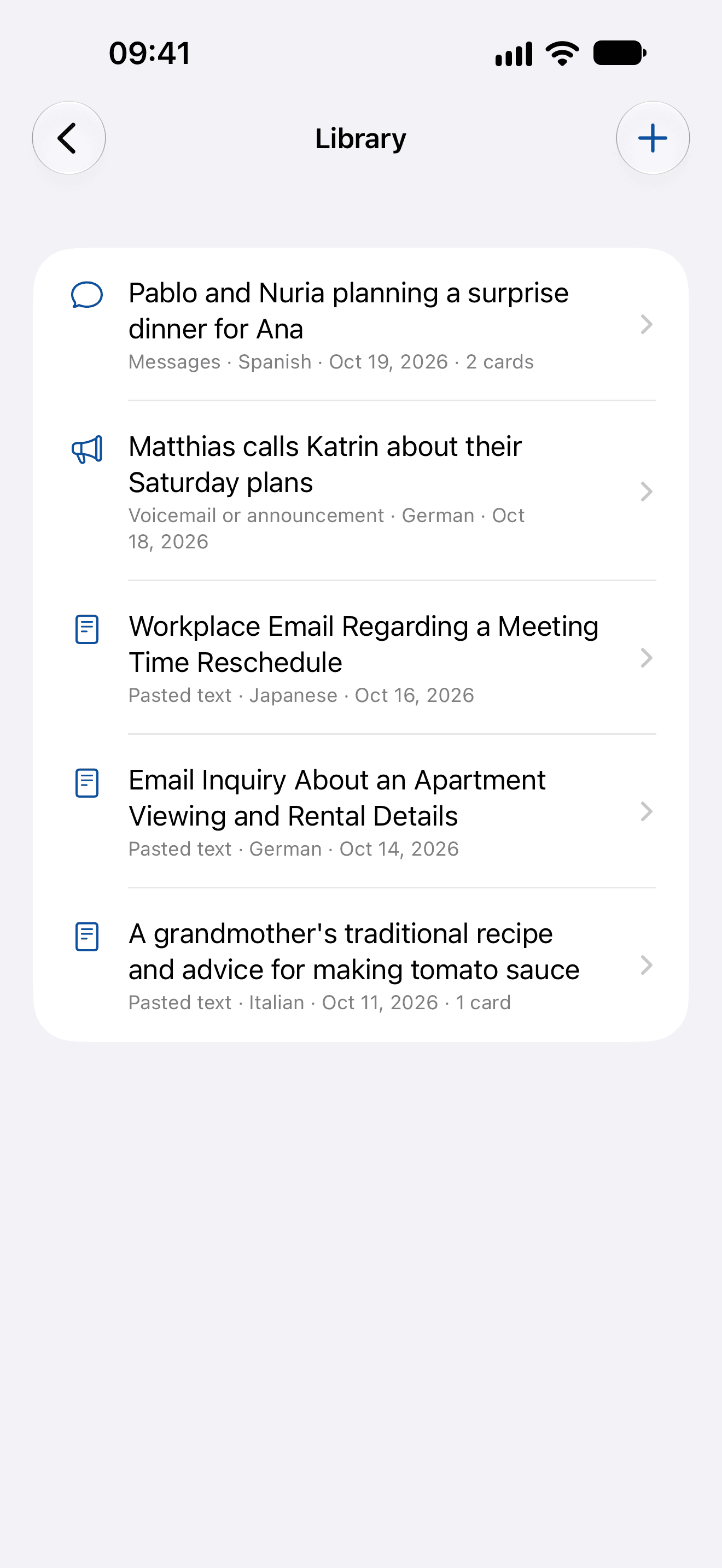
The Library: texts Ideas wrote and texts pasted in, in Spanish, German, Japanese and Italian
06
Progress

Count what stays, not days in a row.

No streak to keep alive. What Home counts is what you’ve kept: the cards and points in your schedule, each one something you’ve mastered and are keeping.
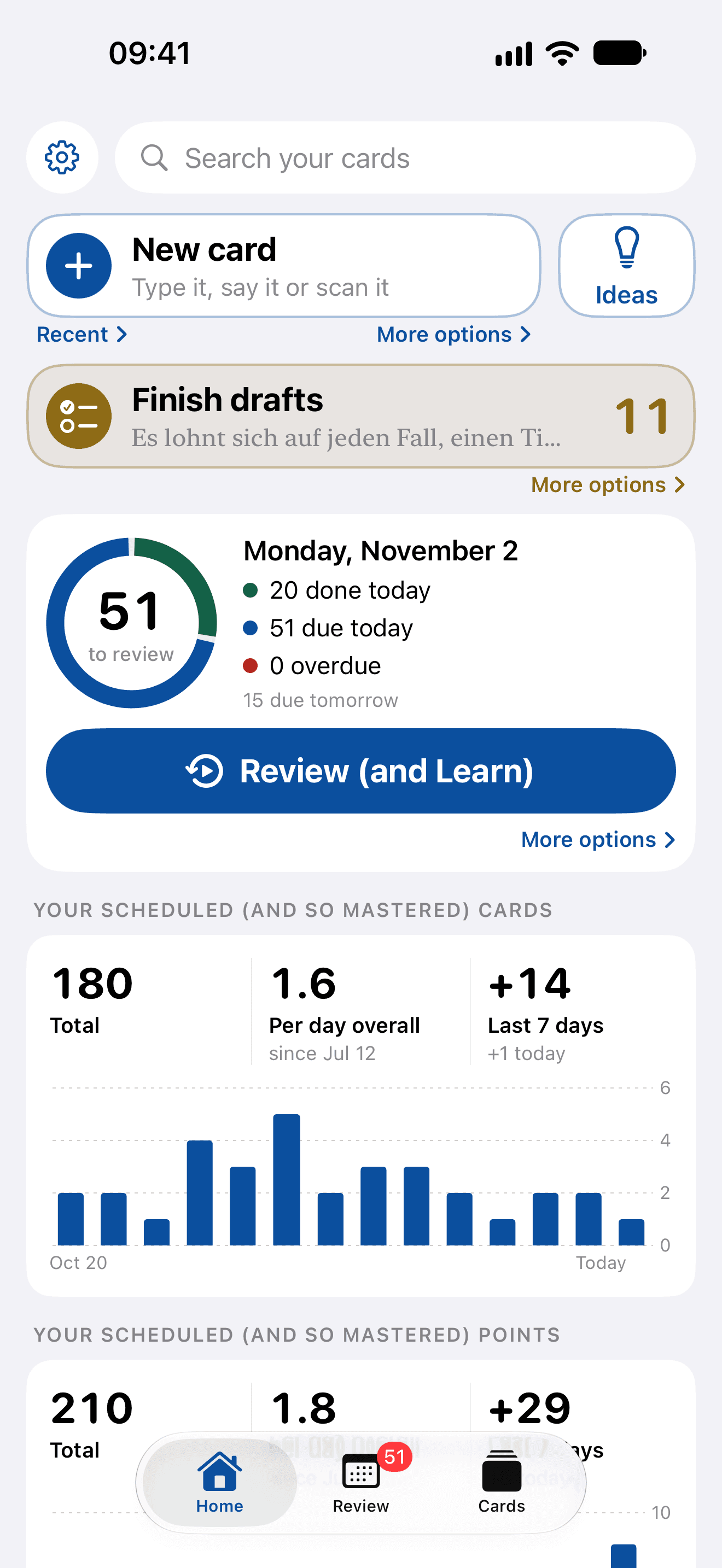
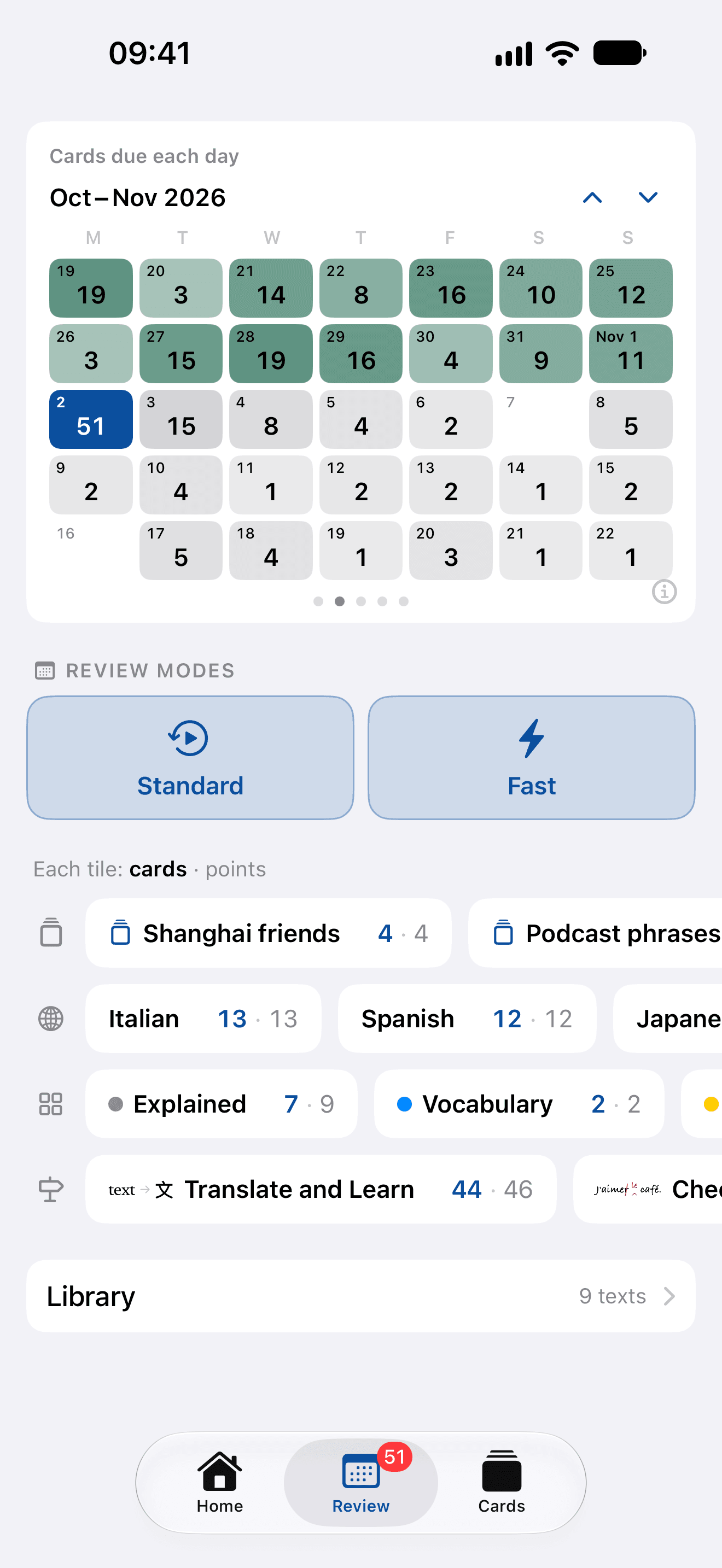
  1. Home: the day’s review ring, then your scheduled (and so mastered) cards in total, per day and over the last seven days, over a chart of fourteen days
  2. Review: a calendar of the weeks around today, the cards due on each day
Home’s counts, and the calendar on Review
In total
Every card with a point in your schedule, and every point, counted apart.
A day, and the last seven
How many entered the schedule a day on average since the first did, and over the past week, with today’s under them.
Fourteen days in a chart
Each bar a day’s new cards in the schedule, so a quiet week shows as one.
The calendar
On Review, the weeks around today drawn in cards: what each day held, and what’s coming.
The large widget: the day’s ring, the next phrase, then your scheduled (and so mastered) cards and points
On your home screen
The large widget keeps the same counts, under the day’s ring.
07
Yours to keep

A phrasebook of everything you’ve met, sorted the way you think.

Decks and tags you named yourself, each carrying what’s due and what’s still a draft. A card leaves through the ordinary share sheet as plain text anyone can read: the phrase, what it means, and everything you kept on it.
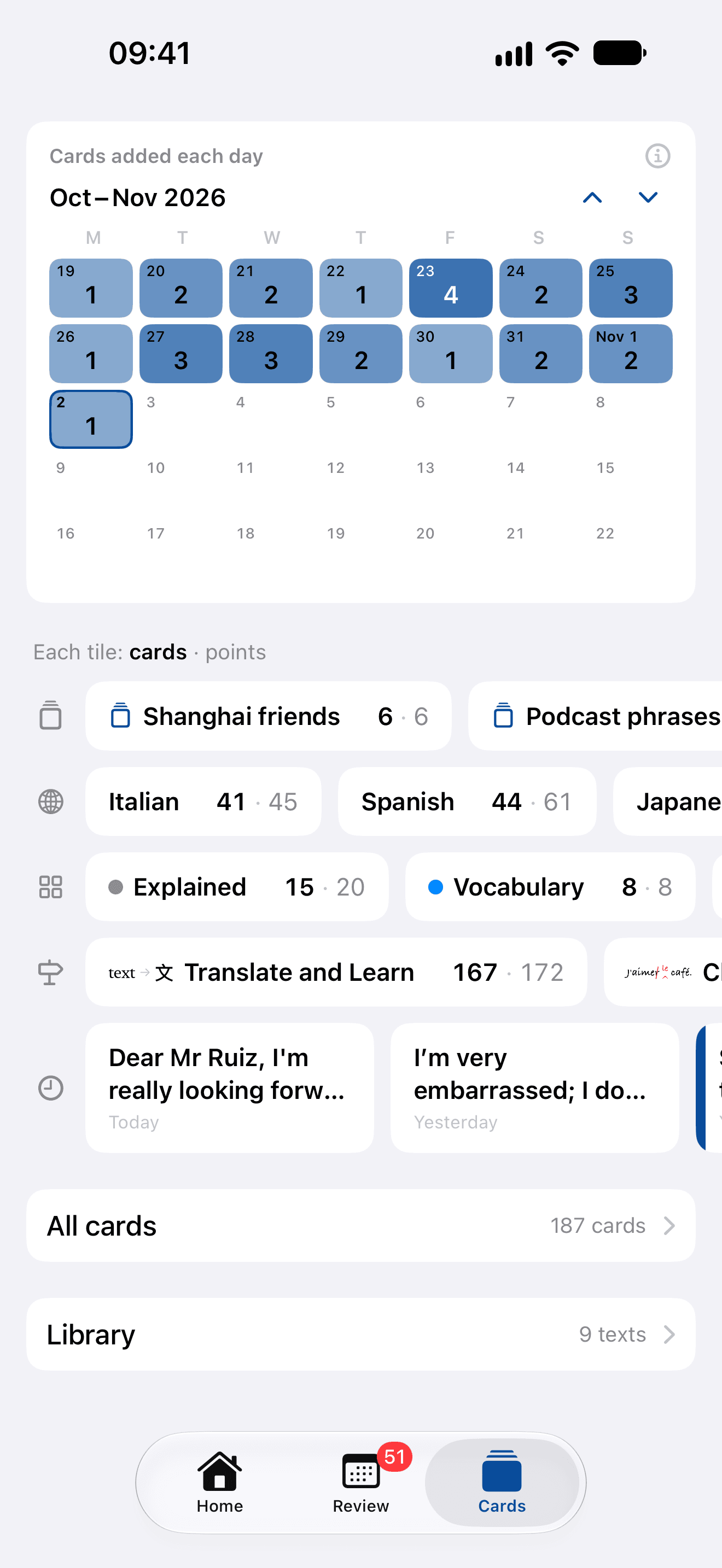
The Cards tab: the cards added each day, decks, tags and languages with their counts, and the Library